Loading
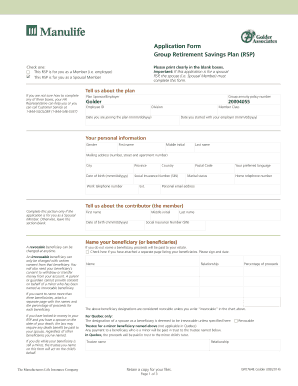
Get Gp0764e Rsp Enrollment - Golderlayout 1 - Manulife
How it works
-

Open form follow the instructions
-

Easily sign the form with your finger
-

Send filled & signed form or save
How to fill out the GP0764E RSP Enrollment - GolderLayout 1 - Manulife online
Completing the GP0764E RSP Enrollment - GolderLayout 1 - Manulife form is an essential step in managing your retirement savings effectively. This guide provides a clear, step-by-step approach to ensure you accurately fill out the form online, whether you are enrolling as a member or as a spousal member.
Follow the steps to complete the enrollment form online.
- Press the ‘Get Form’ button to access the form and open it in your editor.
- Indicate whether the RSP is for you as a member or as a spousal member by checking the appropriate box at the top of the form. Make sure to print clearly in the blank boxes provided.
- In the 'Tell us about the plan' section, provide information about your employer, the group annuity policy number, employee ID, division, member class, and the dates you are joining the plan and started with your employer.
- In the 'Your personal information' section, fill out your gender, first name, middle initial, last name, mailing address, city, province, date of birth, social insurance number, work telephone number, home telephone number, personal email address, and marital status.
- If you are completing the form as a spousal member, complete the 'Tell us about the contributor' section with the required details of your contributing partner.
- In the 'Name your beneficiary (or beneficiaries)' section, designate your beneficiaries by filling in their names, relationships, and the percentage of proceeds they will receive. If necessary, attach additional pages to list more than three beneficiaries.
- Specify your investment instructions in the 'Your investment instructions' section by selecting either the 'Retirement Date Fund' or 'Build your own portfolio' options. Ensure that the total percentages add up to 100%.
- Indicate whether you want Manulife to rebalance your investments by checking the appropriate box. Ensure you understand the conditions of rebalancing further described in the section.
- Sign and date the form in the designated area to confirm your understanding and agreement to the information provided.
- Mail your completed form to the appropriate address for Manulife based on your location, as specified at the end of the form.
Take action now by completing your GP0764E RSP Enrollment form online to secure your retirement savings.
Withdrawals can either be in the form of cash (provided savings are not locked-in), or a transfer to an external RRSP.
Industry-leading security and compliance
US Legal Forms protects your data by complying with industry-specific security standards.
-
In businnes since 199725+ years providing professional legal documents.
-
Accredited businessGuarantees that a business meets BBB accreditation standards in the US and Canada.
-
Secured by BraintreeValidated Level 1 PCI DSS compliant payment gateway that accepts most major credit and debit card brands from across the globe.