Loading
Get Maturity Claim Bapplicationb Form - Max Life Insurance
How it works
-

Open form follow the instructions
-

Easily sign the form with your finger
-

Send filled & signed form or save
How to fill out the Maturity Claim Application Form - Max Life Insurance online
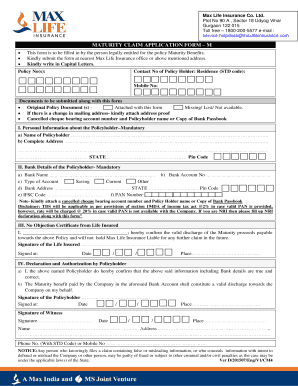
This guide will assist you in completing the Maturity Claim Application Form for Max Life Insurance seamlessly online. By following the steps outlined below, you can ensure that your application is filled out accurately and submitted correctly.
Follow the steps to complete the Maturity Claim application form online.
- Click ‘Get Form’ button to obtain the form and open it in the editor for completion.
- Begin by entering your policy number(s) in the designated field. Ensure that the information matches your original policy documents.
- Provide your contact number in the specified field. Include both your residence and mobile numbers for effective communication.
- In the section for personal information, fill in the name of the policyholder in capital letters, followed by the complete address including state and pin code.
- Next, move to the bank details section. You will need to input your bank name, account number, and select the type of account: Savings, Current, or Other. Additionally, provide the bank's address and IFSC code.
- Enter your PAN number in the provided space. Remember to attach a canceled cheque or bank passbook as required.
- Complete the No Objection Certificate section with the life insured's signature and details, confirming the discharge of maturity proceeds.
- Proceed to the declaration and authorization section where the policyholder must confirm the accuracy of the provided information and sign accordingly.
- If applicable, fill out the NRI declaration form, providing all necessary details regarding residency and tax compliance.
- Review all information for accuracy. Once completed, you can save changes, download the form, print it, or share it as needed.
Ensure to complete and submit your Maturity Claim Application Form online for a smooth process.
Bank account number. Confirm Bank account number. Account holder's name. IFSC code. MICR code. Bank and Branch Name.