Loading
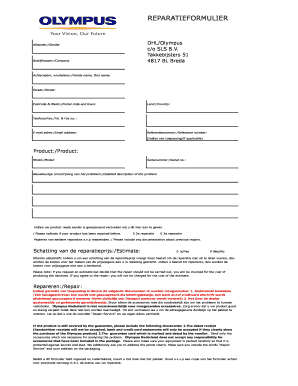
Get Reparatie Formulier Download - Olympus - Olympus
How it works
-

Open form follow the instructions
-

Easily sign the form with your finger
-

Send filled & signed form or save
How to use the Reparatie Formulier Download - Olympus - Olympus online
Filling out the Reparatie Formulier for Olympus products is a straightforward process that ensures your repair request is properly submitted. This guide provides step-by-step instructions to help you navigate the form with ease.
Follow the steps to complete the Reparatie Formulier successfully.
- Click the ‘Get Form’ button to download the Reparatie Formulier and open it for editing.
- In the sender section, fill in your company name, followed by your family name and initials. Provide your complete street address, postal code, and town to ensure accurate delivery.
- Specify your country and provide your telephone and fax numbers, along with your email address for further communication.
- Enter the reference number if applicable. Also, indicate the product you are sending in for repair, including its model and serial number.
- Provide a detailed description of the issue you are experiencing with the product. If previous repairs have been performed on the product, indicate that in the designated section.
- If you wish to receive a repair price estimate, specify that in the estimate section. Note the implications if you decide not to proceed with the repair after receiving the estimate.
- If your product is under warranty, attach the necessary documentation including a dated sales receipt and the stamped guarantee card from the reseller. Ensure to only include essential accessories needed for diagnosis.
- After completing and signing the form, enclose it within the parcel along with your product. Keep a copy of the form for your records in case you need to inquire about the repair status.
- Clearly label the parcel with the words 'Repair Service' and your address, ensuring it is well-protected against damage.
Complete your Reparatie Formulier online and ensure your device is promptly repaired.
Open your Word file, select the text you want to redact, and click the arrow next to the “Highlight” icon, then choose black color. This action will camouflage the content with the shading. Hint: If the text is of a color other than black, you should use a similar color, so it is not visible.