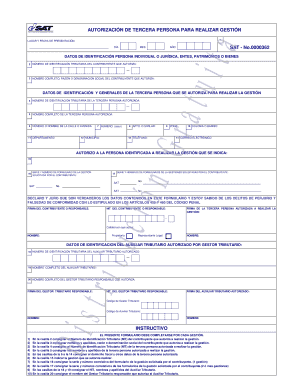
AUTORIZACIN DE TERCERA PERSONA PARA REALIZAR GESTIN 1 LUGAR Y FECHA DE PRESENTACIN: DA MES SAT No.0000362 AO DATOS DE IDENTIFICACIN PERSONA INDIVIDUAL O JURDICA, ENTES, PATRIMONIOS O BIENES 2 NMERO.

How it works
  • Open form

    Open form follow the instructions

  • Easily sign form

    Easily sign the form with your finger

  • Share form

    Send filled & signed form or save

How to fill out the Formulario SAT-0362 Departamento De Gestin - IRG online

The Formulario SAT-0362 is essential for authorizing a third party to carry out management tasks on behalf of a contributor. This guide provides a step-by-step approach to efficiently fill out the form online, ensuring compliance and clarity. Follow the instructions carefully to successfully complete your submission.

Follow the steps to fill out the Formulario SAT-0362 online.

  1. Click the ‘Get Form’ button to obtain the form and open it in the editing interface.
  2. In Box 2, enter the taxpayer identification number (NIT) of the contributor authorizing the management.
  3. In Box 3, provide the full name or business name of the contributor granting the authorization.
  4. In Box 4, fill in the NIT of the authorized third party who will perform the management.
  5. In Box 5, enter the full name of the authorized third party.
  6. From Boxes 6 to 14, complete the address information for the authorized third party, including street number, apartment number, town, department, municipality, phone number, and email.
  7. In Box 15, specify the management that the authorized person is permitted to perform.
  8. Box 16 requires you to enter the series and number of the form for the management requested by the contributor (for a single management).
  9. In Box 17, include the series and number of forms for multiple management requests made by the contributor.
  10. Complete Boxes 18 and 19 with the NIT and full name of the authorized tax assistant.
  11. Lastly, in Box 20, indicate the name of the responsible tax manager who authorizes the assistant.
  12. After ensuring all information is accurate, save your changes, download, print, or share the completed form as needed.

Complete your Formulario SAT-0362 online today to ensure timely processing and compliance.

Get form

Experience a faster way to fill out and sign forms on the web. Access the most extensive library of templates available.

Related content

General Letter No. 6-AP-120 - Iowa Department of...

May 20, 2016 — Update the instructions and form 470-0042, Case Activity Report, for use...

Learn more
Formulario Sat 362 - [Mobi] Home Ebooks

Formulario. Sat 362. [Mobi] Formulario Sat 362. Ebooks. AUTORIZACIÓN DE TERCERA. PERSONA...

Learn more
Distrito escolar Steelton-Highspire...

En julio de 2012, el Departamento de Educación de Pensilvania (PDE) publicó un ... En...

Learn more
Questions & Answers

Get answers to your most pressing questions about US Legal Forms API.

Contact support

¿Cómo puedo entrar a mi portal en el SAT?

Ingresas a través de: .gob.mx/sat.

– Es la nueva herramienta de SAT que te permite realizar solicitud de NIT, actualización de datos y cese de actividades comerciales y/o de servicios, desde cualquier dispositivo electrónico (computadora, Tablet, teléfono móvil).

Ingresas a él a través de la dirección .sat.gob.mx. Buzón tributario: es tu portal personal a través del cual tendrás acceso a los trámites y servicios que te corresponden de acuerdo a tu régimen fiscal, podrás agregar favoritos, consultar información fiscal, así como recibir mensajes de interés y notificaciones..

En este sentido, se tiene que el problema de la imposibilidad de ingresar a los servicios de Internet del SAT se debe a la caducidad de la Contraseña, por lo que la solución es renovarla.

Pasos para generar tu solicitud de usuario Llena tu solicitud. El sistema te enviará un mensaje a tu correo electrónico registrado. Ingresa al enlace que recibirás, para confirmar el código de seguridad. El sistema habilitará una ventana para adjuntar lo siguiente:

Pasos para la actualización de datos de RTU en línea Ingresar a la agencia virtual desde el portal de la SAT. Seleccionar la opción «RTU» y luego «Actualización de datos». Automáticamente, aparecerá un formulario el cual hay que llenar los datos correspondientes. Confirmar la modificación y enviar la solicitud.

Cómo obtener usuario de SAT en línea Ingresar a la opción de solicitud de usuario. Completar la información que se requiere. Luego, el sistema enviará un mensaje al correo electrónico proporcionado por el contribuyente.

¿Cómo accedo? Ingresa a la opción “Regístrate”, el sistema te mostrará un formulario. Ingresa tu DNI, carnet de extranjería, pasaporte o RUC según corresponda. Ingresa tus datos personales tales como datos de contacto, domicilio real, entre otros. ... Finalmente, ingresa tu contraseña y acepta los términos y condiciones.

Get This Form Now!

Use professional pre-built templates to fill in and sign documents online faster. Get access to thousands of forms.

If you believe that this page should be taken down, please follow our DMCA take down process here.

Get Formulario SAT-0362 Departamento De Gestin - IRG