Loading
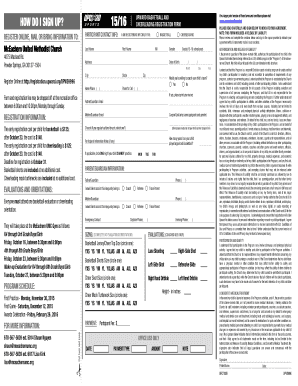
Get 2015-2016-upward-basketball-cheer-brochure - Mceachern - Mceachernumc
How it works
-

Open form follow the instructions
-

Easily sign the form with your finger
-

Send filled & signed form or save
How to fill out the 2015-2016-Upward-Basketball-Cheer-Brochure - McEachern - Mceachernumc online
Filling out the 2015-2016-Upward-Basketball-Cheer-Brochure online is a straightforward process that ensures your child's participation in the program. This guide provides step-by-step instructions to help you navigate the form effectively.
Follow the steps to complete the registration form seamlessly.
- Click the ‘Get Form’ button to access the brochure and open it in the online editor.
- Begin by entering the participant's contact information. Fill in the last name, first name, middle initial, and gender. Include the child's grade for the 15-16 school year and their date of birth.
- Review the ‘Authorization and Release of Liability’ section carefully. By signing this section, you are permitting your child’s participation in the Upward Unlimited athletic program and agreeing to the release of liability terms.
- Address the registration information. Note the early registration costs for basketball and cheerleading, and ensure you understand the deadlines and what is included with your child's registration.
- Provide any necessary information regarding evaluations or orientations. Indicate your willingness to assist with your child's team and provide carpool links if applicable.
- Fill out any necessary sizing information required for uniforms. This will typically be done at evaluations or orientations.
- Complete the payment section by entering the participant fee. Specify the payment type and amount.
- Lastly, carefully read all additional information including consent to medical treatment, ensuring that all entries in the form are accurate. Sign and date the form as required.
- Once you have completed all sections of the form, you can save changes, download a copy, print the form, or share it as needed.
Complete your registration online today to ensure your child's participation in the upcoming season!
Drag a title to the location that you want In the chart, click the title that you want to move to another location. To move the title, position the pointer on the border of the title box so that it changes to a four-headed arrow. , and then drag the title box to the location that you want.
Industry-leading security and compliance
US Legal Forms protects your data by complying with industry-specific security standards.
-
In businnes since 199725+ years providing professional legal documents.
-
Accredited businessGuarantees that a business meets BBB accreditation standards in the US and Canada.
-
Secured by BraintreeValidated Level 1 PCI DSS compliant payment gateway that accepts most major credit and debit card brands from across the globe.