Loading
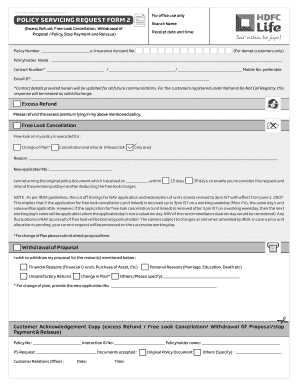
Get Excess Refund Free Look Cancellation Withdrawal Of - Hdfc Life - Hdfclife
How it works
-

Open form follow the instructions
-

Easily sign the form with your finger
-

Send filled & signed form or save
How to fill out the Excess Refund Free Look Cancellation Withdrawal Of - HDFC Life - Hdfclife online
Completing the Excess Refund Free Look Cancellation Withdrawal Of form with HDFC Life is a straightforward process. This guide will provide you with clear, step-by-step instructions to assist you in filling out the form accurately online.
Follow the steps to successfully complete the form.
- Click ‘Get Form’ button to obtain the form and open it in the provided editor.
- Start by entering your policy number in the designated field. This is crucial for HDFC Life to identify your specific policy.
- Provide your e-Insurance account number if applicable. This is especially important for demat customers.
- Fill in your name as the policyholder, ensuring it matches the information on your policy documents.
- Input your contact number, including your mobile number, as these details will be updated for future communications.
- Enter your email address. This will be used for any follow-up communications regarding your request.
- Decide whether you are requesting an excess refund or free look cancellation. If requesting a refund, indicate this clearly.
- If you are opting for the free look cancellation, decide on the reason and tick the appropriate box.
- For ‘Withdrawal of Proposal’, list the reason from the provided categories, including financial or personal reasons.
- Complete the NEFT mandate if selecting payout via bank transfer. Fill in your bank account details accurately, including IFSC code.
- Review your entries for accuracy and completeness before saving your progress.
- Finally, save your changes, and follow any prompts to download, print, or share your completed form.
Complete your form online now to ensure your request is processed smoothly.
In order to check the status of one's policy, one will be required to visit the webpage www.hdfclife.com/customer-service/policy-servicing. A tab 'Policy Status' will then appear on the screen which will display two options - 'My Account' and 'Call Centre/Email'.
Industry-leading security and compliance
US Legal Forms protects your data by complying with industry-specific security standards.
-
In businnes since 199725+ years providing professional legal documents.
-
Accredited businessGuarantees that a business meets BBB accreditation standards in the US and Canada.
-
Secured by BraintreeValidated Level 1 PCI DSS compliant payment gateway that accepts most major credit and debit card brands from across the globe.