Loading
Get I Valgevene Vabariik Viisaankeet
How it works
-

Open form follow the instructions
-

Easily sign the form with your finger
-

Send filled & signed form or save
How to fill out the I Valgevene Vabariik Viisaankeet online
Filling out the I Valgevene Vabariik Viisaankeet online can seem overwhelming, but with clear guidance, you can navigate the process easily. This guide provides step-by-step instructions for each section of the form to ensure you complete it accurately.
Follow the steps to complete the visa application form successfully
- Click ‘Get Form’ button to obtain the form and open it in the editor.
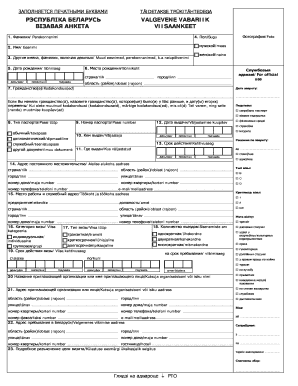
- In the first section, enter your last name in the designated field marked 'Фамилия/Perekonnanimi'. Ensure correct spelling as it appears on official documents.
- Provide your first name in the 'Имя/Eesnimi' field. Double-check for accuracy.
- If you have any additional names or surnames, including your maiden name, fill them in the 'Другие имена, фамилии, включая девичью/Muud eesnimed, perekonnanimed, k.a neiupõlvenimi' section.
- Select your gender by marking the appropriate box under 'Пол/Sugu'. Options are male (мужской/mees) or female (женский/naine).
- Enter your date of birth in the 'Дата рождения/Sünniaeg' section, filling in day, month, and year accordingly.
- Indicate your place of birth in the 'Место рождения/Sünnikoht' field, including country and region.
- Attach a recent photograph in the designated section marked 'Фотография/Foto'.
- List your citizenship(s) in the 'Гражданство(а)/Kodakondsus(ed)' field. If you have changed citizenship, provide details in the follow-up field.
- Specify the type of passport you hold in the 'Тип паспорта/Passi tüüp' section by checking the corresponding box.
- Fill in your passport number in the 'Номер паспорта/Passi number' field. This should be the complete number as seen on the document.
- Provide the date of issuance of your passport in the 'Дата выдачи/Väljastamise kuupäev' section, ensuring all date fields are populated accurately.
- Complete the section regarding the authority that issued your passport, filling in both the issuing body and location.
- Enter your permanent residential address in Belarus in the 'Адрес постоянного местожительства/Alalise elukoha aadress' field. Include all relevant details.
- For work-related information, detail your workplace and job title in 'Место работы и служебный адрес/Töökoht ja töökoha aadress'.
- Select the type and category of visa you are applying for by marking the appropriate boxes in the relevant sections.
- Fill in the purpose of your visit in the 'Мета візіту' section, providing clear and concise information.
- State the amount of entries you wish to have for your visa. Options include single, double, or multiple entries.
- Complete the visa validity period, specifying dates in the 'Срок действия визы/Viisa kehtivusaeg' section.
- Declare any previous visits to Belarus accurately in the corresponding fields, providing relevant dates and purpose of visits.
- If applicable, complete any required fields related to past visa refusals or legal issues during previous visits.
- Review all information entered for accuracy and completeness before proceeding.
- Once completed, save changes, and you may choose to download, print, or share the form as needed.
Take action now and fill out your I Valgevene Vabariik Viisaankeet online with confidence.