Loading
Get Williamson County Tn Court Clerk
How it works
-

Open form follow the instructions
-

Easily sign the form with your finger
-

Send filled & signed form or save
How to fill out the Williamson County TN Court Clerk online
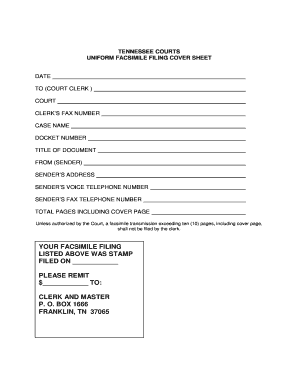
Filing documents with the Williamson County Court Clerk online can streamline your legal processes and ensure that your paperwork is submitted correctly. This guide provides a step-by-step approach to completing the Uniform Facsimile Filing Cover Sheet accurately and efficiently.
Follow the steps to fill out the form online effectively.
- Click ‘Get Form’ button to obtain the form and open it in the editor.
- Enter the date at the top of the form. Make sure to use the current date to ensure the filing is timely.
- Fill in the 'To (Court Clerk)' field with the name of the court clerk responsible for your case.
- Specify the court where the case is being filed. This is crucial for proper routing of your document.
- Provide the clerk’s fax number in the designated field. This allows the court to receive your documents via fax.
- In the 'Case Name' section, write the full name of the case as it appears in the court records.
- Enter the docket number assigned to your case. This number is essential for identification and tracking purposes.
- Fill in the 'Title of Document' field with a brief description of the document you are submitting.
- In the 'From (Sender)' section, write your name or the name of the person submitting the form.
- Provide the sender’s address for official communication regarding your submission.
- Fill in the sender’s voice telephone number for any necessary follow-up communications from the court.
- Enter the sender’s fax telephone number, if applicable, for additional communication.
- Indicate the total number of pages included in the submission, including the cover page to avoid issues with court filing limits.
- Review the completed form to ensure all fields are accurately filled out before final submission.
- Once satisfied with the information, proceed to save any changes, and prepare your form for downloading, printing, or sharing as necessary.
Start submitting your documents online today for a more efficient filing process.
For questions regarding citation issuance or for special urgent handling please contact the District Clerk's office at (512) 943-1212.