Loading
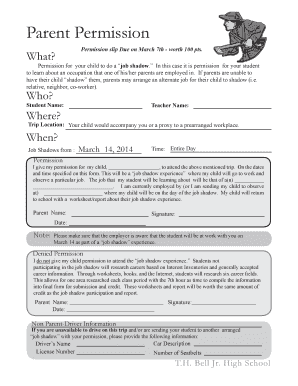
Get Parent Permission - Job Shadow Th Bell Th Grade Job Shadow Parent Permission
How it works
-

Open form follow the instructions
-

Easily sign the form with your finger
-

Send filled & signed form or save
How to fill out the Parent Permission - Job Shadow TH Bell Th Grade Job Shadow Parent Permission online
Filling out the Parent Permission form for the Job Shadow program is a straightforward process that allows parents to grant permission for their children to learn about different occupations. This guide will walk you through each section of the form to ensure a smooth submission experience.
Follow the steps to complete the form accurately and efficiently.
- To begin, click the ‘Get Form’ button to access the form and open it in the appropriate format for editing.
- In the first section, fill in the student’s name and teacher’s name. This information helps to identify the student participating in the job shadow.
- Next, provide the trip location where your child will be shadowing. This should be the physical address of the workplace.
- Specify the date of the job shadowing experience, which will be March 14, 2014, and indicate that it will be for the entire day.
- In the permission section, clearly state your child's name and your relationship to them in the designated areas. Specify the job your student will be learning about by filling in the corresponding blanks.
- Complete the employer information with the name of the employer where your child will be shadowing. It is crucial that the employer is aware of the student’s participation.
- If you are unable to drive your child, please fill out the non-parent driver information section with the driver’s name, license number, car description, and the number of seatbelts available.
- Finally, review all the information you’ve entered, save your changes, and proceed to download, print, or share the completed form as needed.
Complete your Parent Permission form online now to ensure your child can participate in the job shadow experience.
To update your billing address or contact information: Sign in. You'll be taken to the Notifications section within Settings. Under Billing & Order Notifications, select Manage. Update your billing address and/or contact info, and then select Save.
Industry-leading security and compliance
US Legal Forms protects your data by complying with industry-specific security standards.
-
In businnes since 199725+ years providing professional legal documents.
-
Accredited businessGuarantees that a business meets BBB accreditation standards in the US and Canada.
-
Secured by BraintreeValidated Level 1 PCI DSS compliant payment gateway that accepts most major credit and debit card brands from across the globe.