Loading
Form preview
  • US Legal Forms
  • Form Library
  • More Forms
  • More Uncategorized Forms
  • Money Order Log

Get Money Order Log

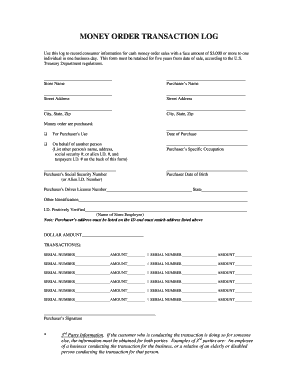
MONEY ORDER TRANSACTION LOG Use this log to record consumer information for cash money order sales with a face amount of $3,000 or more to one individual in one business day. This form must be retained.

How it works

  1. Open form

    Open form follow the instructions

  2. Easily sign form

    Easily sign the form with your finger

  3. Share form

    Send filled & signed form or save

How to fill out the Money Order Log online

The Money Order Log is an essential tool for recording consumer information for cash money order sales exceeding $3,000. This guide will provide you with a clear and comprehensive understanding of how to accurately complete the form online.

Follow the steps to effectively fill out the Money Order Log

  1. Press the 'Get Form' button to access the Money Order Log and open it in your preferred editing tool.
  2. Begin by entering your store name in the designated field at the top of the form.
  3. Input the purchaser’s name in the provided space. Ensure the name is accurate and reflects the individual making the purchase.
  4. Fill in the street address of the purchaser. If applicable, repeat this for the second street address field.
  5. Enter the city, state, and zip code relevant to the purchaser’s address in the specified fields.
  6. Select the reason for the money order purchase by checking the appropriate option: for the purchaser’s own use or on behalf of another person. If acting on someone else's behalf, list the additional person's details on the back of the form as instructed.
  7. Provide the purchaser's Social Security Number or Alien I.D. Number in the allocated space.
  8. Record the date of purchase accurately in the designated area.
  9. Input the purchaser’s specific occupation to ensure comprehensive reporting.
  10. Enter the purchaser's date of birth in the specified format.
  11. Fill in the purchaser’s driver license number, followed by the issuing state.
  12. Document any other identification details as necessary.
  13. Confirm that the I.D. has been positively verified by entering the name of the store employee responsible for verification.
  14. List the total dollar amount of the money order in the designated field.
  15. Complete the transaction section by entering the serial numbers and amounts for each money order sold. Ensure all fields are filled for all transactions conducted.
  16. Finally, obtain the purchaser’s signature in the designated area to validate the transaction.
  17. Once all fields are completed, save your changes. You may download, print, or share the Money Order Log as needed.

Complete your Money Order Log online today for accurate record-keeping.

Get form

Experience a faster way to fill out and sign forms on the web. Access the most extensive library of templates available.

Related content

Bank Secrecy Act Requirements - FinCEN.gov
transactions of more than $10,000 with the same customer in a day, it must file a CTR. 1...
Learn more
money laundering prevention - FinCEN.gov
Your business may be an MSB (Money Services Business) if… The business ... Monetary...
Learn more
US Postal Money Order - Bisq Wiki
Nov 27, 2020 — English; Log in. Namespaces. Page · Discussion ...
Learn more

Related links form

KS Wichita Force Dance Team Tryout Registration Form 2014 KY Fort Campbell Veterinary Center Registration Packet 2019 MA Talent Bank Form - Town Of Rehoboth 2014 MA WPA Form 8B 2020

Questions & Answers

Get answers to your most pressing questions about US Legal Forms API.

Contact support

Money Orders: Whenever a customer purchases money orders, or checks, with cash in the amount of $3,000 to $10,000 certain information must be obtained and retained. (Purchases of more than $10,000 require filing a Currency Transaction Report (CTR) which is explained later in these materials.)

Look for Physical Clues of Money Order Fraud Sometimes, you can tell that a money order is fake just by looking at it. Most money orders have security features like watermarks and a special ink that will run or change colors if anyone tries to change information on the money order, such as the amount.

6. Monetary Instrument Log MSBs must maintain certain information on the sale of monetary instruments such as money orders or traveler's checks from $3,000 to $10,000, inclusive.

Money Orders: Whenever a customer purchases money orders, or checks, with cash in the amount of $3,000 to $10,000 certain information must be obtained and retained. (Purchases of more than $10,000 require filing a Currency Transaction Report (CTR) which is explained later in these materials.)

How can I find out if it has been cashed? You can find out if your money order has been cashed online by clicking Money Order Status or by calling our automated line at 1-800-542-3590. You will need to enter your money order number and the exact dollar amount of your money order.

How to use a money order. When you purchase a money order, you pay the full amount upfront plus a small fee. After verifying that the amount is correct, you'll need to fill in your name and contact information on the front of the money order, plus the name of the recipient and their contact information.

Use this log to record consumer information for cash money order sales with a face amount of $3,000 or more to one individual in one business day. This form must be retained for five years from date of sale, according to the U.S. Treasury Department regulations.

Fill in the recipient's name. Write your address in the purchaser section. Include your account number if you're paying a bill. Sign the bottom where it says "purchaser's signature." Keep your receipt.

Cash also includes cashier's checks, bank drafts, traveler's checks, and money orders. ... You have to file the form within 15 days after receiving the cash. You can file the form electronically or mail it to the IRS. A copy of this form is sent to the Financial Crimes Enforcement Network (FinCEN).

Money orders generally clear almost immediately, and if you (or the person you send a money order to) are redeeming it for cash, you should receive the funds right away. However, some banks may take as long as 24 hours to deposit a money order into your account, especially if you deposit it later in the day.

Get This Form Now!

Use professional pre-built templates to fill in and sign documents online faster. Get access to thousands of forms.
If you believe that this page should be taken down, please follow our DMCA take down processhere.

Industry-leading security and compliance

US Legal Forms protects your data by complying with industry-specific security standards.
  • In businnes since 1997
    25+ years providing professional legal documents.
  • Accredited business
    Guarantees that a business meets BBB accreditation standards in the US and Canada.
  • Secured by Braintree
    Validated Level 1 PCI DSS compliant payment gateway that accepts most major credit and debit card brands from across the globe.
Get Money Order Log
  • Adoption
  • Bankruptcy
  • Contractors
  • Divorce
  • Home Sales
  • Employment
  • Identity Theft
  • Incorporation
  • Landlord Tenant
  • Living Trust
  • Name Change
  • Personal Planning
  • Small Business
  • Wills & Estates
  • Packages A-Z
  • Affidavits
  • Bankruptcy
  • Bill of Sale
  • Corporate - LLC
  • Divorce
  • Employment
  • Identity Theft
  • Internet Technology
  • Landlord Tenant
  • Living Wills
  • Name Change
  • Power of Attorney
  • Real Estate
  • Small Estates
  • Wills
  • All Forms
  • Forms A-Z
  • Form Library
  • Legal Hub
  • About Us
  • Help Portal
  • Legal Resources
  • Blog
  • Affiliates
  • Contact Us
  • Delete My Account
  • Site Map
  • Industries
  • Forms in Spanish
  • Localized Forms
  • State-specific Forms
  • Forms Kit
  • Real Estate Handbook
  • All Guides
  • Notarize
  • Incorporation services
  • For Consumers
  • For Small Business
  • For Attorneys
  • USLegal
  • FormsPass
  • pdfFiller
  • signNow
  • altaFlow
  • DocHub
  • Instapage
Form Packages
  • Adoption
  • Bankruptcy
  • Contractors
  • Divorce
  • Home Sales
  • Employment
  • Identity Theft
  • Incorporation
  • Landlord Tenant
  • Living Trust
  • Name Change
  • Personal Planning
  • Small Business
  • Wills & Estates
  • Packages A-Z
Form Categories
  • Affidavits
  • Bankruptcy
  • Bill of Sale
  • Corporate - LLC
  • Divorce
  • Employment
  • Identity Theft
  • Internet Technology
  • Landlord Tenant
  • Living Wills
  • Name Change
  • Power of Attorney
  • Real Estate
  • Small Estates
  • Wills
  • All Forms
  • Forms A-Z
  • Form Library
Customer Service
  • Legal Hub
  • About Us
  • Help Portal
  • Legal Resources
  • Blog
  • Affiliates
  • Contact Us
  • Delete My Account
  • Site Map
  • Industries
  • Forms in Spanish
  • Localized Forms
  • State-specific Forms
  • Forms Kit
Legal Guides
  • Real Estate Handbook
  • All Guides
Prepared for you
  • Notarize
  • Incorporation services
Our Customers
  • For Consumers
  • For Small Business
  • For Attorneys
Our Sites
  • USLegal
  • FormsPass
  • pdfFiller
  • signNow
  • altaFlow
  • DocHub
  • Instapage
Social Media
Call us now toll free:
+1 833 426 79 33
As seen in:
© Copyright 1999-2026 airSlate Legal Forms, Inc. 3720 Flowood Dr, Flowood, Mississippi 39232
  • Your Privacy Choices
  • Terms of Service
  • Privacy Notice
  • Content Takedown Policy
  • Bug Bounty Program
Money Order Log
This form is available in several versions.
Select the version you need from the drop-down list below.
2017 MoneyGram Money Order Transaction Log
Select form
  • 2017 MoneyGram Money Order Transaction Log
  • Money Order Log
Select form