Loading
Get Tiaa-cref Brokerage Services Automated Clearing House Ach Authorization Agreement
How it works
-

Open form follow the instructions
-

Easily sign the form with your finger
-

Send filled & signed form or save
How to fill out the TIAA-CREF Brokerage Services Automated Clearing House ACH Authorization Agreement online
Filling out the TIAA-CREF Brokerage Services Automated Clearing House (ACH) Authorization Agreement online is a structured process that allows users to set up electronic transfers between their brokerage account and bank account. This guide provides a clear, step-by-step approach to ensure you accurately complete the form.
Follow the steps to successfully fill out the ACH Authorization Agreement.
- Click ‘Get Form’ button to access the TIAA-CREF Brokerage Services ACH Authorization Agreement and open it in the editing interface.
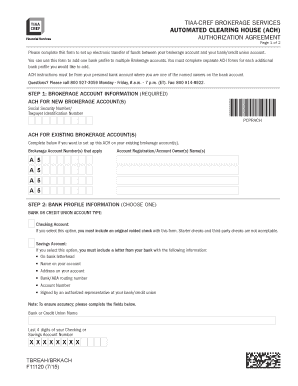
- Begin by entering your brokerage account information in Step 1. If you are setting up ACH for a new brokerage account, provide your Social Security Number or Taxpayer Identification Number. If it's for an existing account, list the applicable brokerage account number(s) and account owner(s) name(s).
- Proceed to Step 2 to input your bank profile information. Choose the type of account you wish to link (checking or savings). If selecting a checking account, include a voided check. For a savings account, provide a letter from your bank containing required details such as your name, account information, and bank routing number.
- In Step 3, you will find the Agreement and Signature section which requires you to authorize TIAA-CREF to establish the bank profile for electronic transfers. Make sure to sign the document; all bank and brokerage account owners need to sign this form.
- Move on to Step 4 where you must agree to the terms and conditions outlined in the Agreement. This section provides important disclosures about the ACH services and their regulations.
- If applicable, Step 5 requires any additional financial institution account owners to consent to the terms. Their signature confirms their acknowledgment.
- Finally, return the completed form, along with any required documentation, to TIAA-CREF using the specified fax line or mailing addresses. Alternatively, you can upload the form online via your account.
Complete your documents online to facilitate your electronic transactions effortlessly.
ACH stands for Automated Clearing House, a U.S. financial network used for electronic payments and money transfers. Also known as direct payments, ACH payments are a way to transfer money from one bank account to another without using paper checks, credit card networks, wire transfers, or cash.
Industry-leading security and compliance
US Legal Forms protects your data by complying with industry-specific security standards.
-
In businnes since 199725+ years providing professional legal documents.
-
Accredited businessGuarantees that a business meets BBB accreditation standards in the US and Canada.
-
Secured by BraintreeValidated Level 1 PCI DSS compliant payment gateway that accepts most major credit and debit card brands from across the globe.