Loading
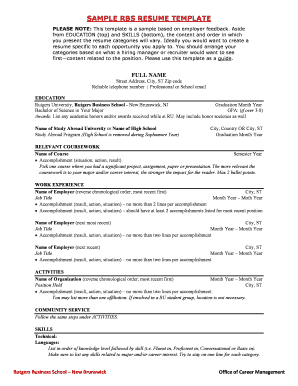
Get Rbs Resume Template
How it works
-

Open form follow the instructions
-

Easily sign the form with your finger
-

Send filled & signed form or save
How to fill out the Rbs Resume Template online
Creating a strong resume is essential for showcasing your qualifications and making a positive impression on potential employers. The Rbs Resume Template is designed to help you effectively present your skills and experiences in a professional format. Follow this guide to fill out the template correctly and efficiently.
Follow the steps to complete the Rbs Resume Template online
- Press the ‘Get Form’ button to access the resume template and open it in your editor.
- Begin by entering your full name at the top of the template, ensuring it is clearly visible.
- Provide your street address, city, state, and zip code, followed by a reliable telephone number and a professional or school email address.
- Navigate to the 'Education' section, starting with the most recent educational experience. List the name of your institution, location, graduation month and year, your degree, and GPA if it is over 3.0. Include any academic honors or awards.
- In the 'Relevant Coursework' section, add the names of courses you completed, along with the semester and year. Include a brief accomplishment related to each course.
- Move to the 'Work Experience' section and list your employment history in reverse chronological order. Start with your most recent job, including the employer's name, location, job title, and employment dates. For each position, include two lines highlighting your accomplishments.
- Proceed to the 'Activities' section, detailing organizational involvement similar to work experience, again using reverse chronological order and including accomplishments.
- In the 'Community Service' section, follow the same format as 'Activities' to list any volunteer work.
- Finally, complete the 'Skills' section by categorizing your technical skills and languages. List them in order of proficiency, and ensure relevant skills are highlighted.
- After verifying all information is accurate and complete, save your changes. You may choose to download the document, print it, or share it as necessary.
Start creating your professional resume using the Rbs Resume Template online today!
1. Reverse-Chronological Resumes. The most widely used resume format among job seekers today, reverse-chronological resumes are also probably the easiest for recruiters and hiring managers to understand at a glance—which is itself an advantage.