Loading
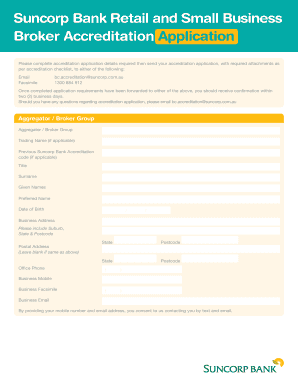
Get Suncorp Bank Editable Accreditation Form - Echoice Broker Services
How it works
-

Open form follow the instructions
-

Easily sign the form with your finger
-

Send filled & signed form or save
How to use or fill out the Suncorp Bank Editable Accreditation Form - EChoice Broker Services online
Filling out the Suncorp Bank Editable Accreditation Form for EChoice Broker Services online is a straightforward process. This guide provides step-by-step instructions to help you navigate the form with ease.
Follow the steps to successfully complete your accreditation application.
- Click the ‘Get Form’ button to access the editable version of the Suncorp Bank Accreditation Form. This will allow you to fill out your details directly online.
- Begin by entering your Aggregator or Broker Group name in the designated field. If applicable, include your Trading Name as well.
- Provide your Previous Suncorp Bank Accreditation code if you have one. This is important for linking your previous accreditation to the new application.
- Enter your Title, Surname, Given Names, and Preferred Name as required in the form. Make sure to input your Date of Birth in the correct format (DD/MM/YYYY).
- Fill in your Business Address, ensuring to include the Suburb, State, and Postcode. If your Postal Address is the same, you may leave that section blank.
- Include your Office Phone and Business Mobile numbers, along with your Business Facsimile number. Also, provide your Business Email address.
- Indicate whether you are an ACL Registration/Licence Holder. If yes, provide your ACL Registration/Licence Number. If no, specify if you are a credit representative of a Registered/Licensed entity, along with that entity's Licence Name.
- Answer the question regarding whether you have ever been expelled from an aggregator or industry body. This will involve selecting 'Yes' or 'No'.
- As part of the accreditation process, ensure you have reviewed the necessary information about Suncorp’s products and processes, indicated by signing in the designated area.
- Finally, after filling out all required fields, save your changes. You can then download, print, or share your completed form as needed.
Complete your application process online now to ensure a smooth accreditation experience.
When overseas, call us on +61 7 3362 1712 for assistance.
Industry-leading security and compliance
US Legal Forms protects your data by complying with industry-specific security standards.
-
In businnes since 199725+ years providing professional legal documents.
-
Accredited businessGuarantees that a business meets BBB accreditation standards in the US and Canada.
-
Secured by BraintreeValidated Level 1 PCI DSS compliant payment gateway that accepts most major credit and debit card brands from across the globe.