Loading
Get Ktsa - Membership Application 2015 - Ktsa
How it works
-

Open form follow the instructions
-

Easily sign the form with your finger
-

Send filled & signed form or save
How to fill out the KTSA - Membership Application 2015 - Ktsa online
Filling out the KTSA - Membership Application is a straightforward process that requires attention to detail. This guide will provide user-friendly, step-by-step instructions to help you complete the application form effectively.
Follow the steps to correctly complete the application.
- Click ‘Get Form’ button to obtain the application and open it for completion.
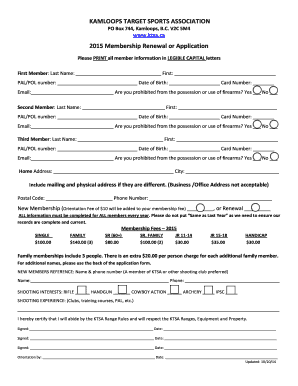
- Begin by entering the information for the first member. Fill in the last name, first name, PAL/POL number, date of birth, card number, email address, and indicate if they are prohibited from the possession or use of firearms.
- Repeat the process for the second and third members as necessary. Ensure that each member's information is distinct and clearly entered.
- Provide your home address, including city, postal code, and phone number. If your mailing and physical addresses differ, include both.
- Specify if this is a new membership or a renewal. Note that a $10 orientation fee will be added for new memberships.
- Review the membership fee structure and select the appropriate membership type. Ensure you account for any additional family members if applicable.
- Provide a reference for new members, including their name and phone number. This adds credibility to your application.
- Indicate your shooting interests and experiences, detailing any relevant clubs or training courses undertaken.
- Sign the application to certify your agreement to abide by the KTSA Range Rules. Each member must also sign and date where indicated.
- After completing the form, save your changes, download the document, and print it out for your records. You may also share or send it as required for submission.
Complete your KTSA membership application online today to enjoy the benefits of membership!