Get Request For Extended Repayment Plan - Palmetto Gba
How it works
-

Open form follow the instructions
-

Easily sign the form with your finger
-

Send filled & signed form or save
How to fill out the Request For Extended Repayment Plan - Palmetto GBA online
Filling out the Request For Extended Repayment Plan - Palmetto GBA online is an essential step for healthcare providers seeking to manage overpayments effectively. This guide provides step-by-step instructions to ensure you complete the form accurately and submit all required documentation.
Follow the steps to successfully complete and submit your request.
- Click ‘Get Form’ button to obtain the form and access it for completion.
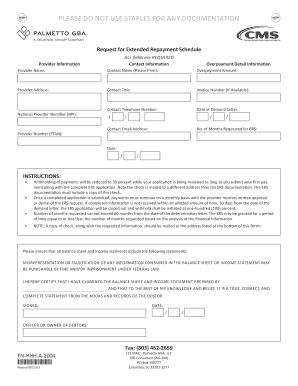
- Begin by filling out the 'Contact Information' section, ensuring all fields are completed thoroughly. This includes providing your contact name, phone number, email address, and preferred method of communication.
- In the 'Provider Information' section, enter the required details such as provider name, address, and National Provider Identifier (NPI). Ensure that all information is accurate to avoid delays.
- Next, complete the 'Overpayment Detail Information' section. Here, you must provide the overpayment amount, invoice number, date of the demand letter, and Provider Number (PTAN).
- Specify the number of months you are requesting for the extended repayment plan. Be mindful of the maximum limit of 60 months.
- If applicable, prepare and include the first payment submission instructions as outlined. Ensure that the check is made payable to Palmetto GBA, referencing 'ERS Request'.
- Gather and attach all supporting documentation required for your request. This may include financial statements, tax returns, and letters from financial institutions.
- Review all completed sections of the form and attached documents for accuracy. Once verified, you can save changes, download a copy of the form, print it, or share it as needed.
Complete your Request For Extended Repayment Plan - Palmetto GBA online today to manage your overpayment effectively.
0:18 1:23 How to Add a Custom Comment Form Title in WordPress - YouTube YouTube Start of suggested clip End of suggested clip Comment form title and activate it once activated. I can go to settings custom. Comment form titleMoreComment form title and activate it once activated. I can go to settings custom. Comment form title in here. I want to add the title that I want to show after I save changes I can create a new post.