Loading
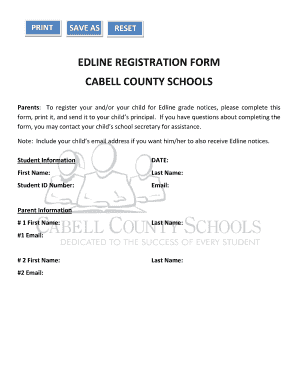
Get Edline Registration Form Cabell County Schools
How it works
-

Open form follow the instructions
-

Easily sign the form with your finger
-

Send filled & signed form or save
How to fill out the EDLINE REGISTRATION FORM CABELL COUNTY SCHOOLS online
Filling out the Edline registration form is a crucial step for parents and guardians wishing to receive grade notices for their children. This guide provides a clear and supportive approach to completing the form online, ensuring that you can navigate the process with ease.
Follow the steps to complete the registration form.
- Click the ‘Get Form’ button to access the Edline registration form and open it in your chosen editor.
- In the Student Information section, enter the current date. Then fill in the student's first name, last name, student ID number, and email address. Make sure to double-check all entries for accuracy.
- Move to the Parent Information section. For Parent #1, input their first name, last name, and email address. For Parent #2, provide their first name, last name, and email address. Ensure that both parents' information is correct to receive notices appropriately.
- After completing all sections of the form, review the entire document for any mistakes or missing information.
- Once you are satisfied with the information provided, you can save the changes, download a copy, print the form, or share it as needed.
Complete your Edline registration form online today to stay updated on your child’s academic progress.
There are no announcements for Cabell County.