Loading
Get Edu/home/portals/
How it works
-

Open form follow the instructions
-

Easily sign the form with your finger
-

Send filled & signed form or save
How to fill out the Edu/Home/Portals/ online
Filling out the Edu/Home/Portals/ form is an essential step in evaluating life changes and their associated stress levels. This guide provides you with step-by-step instructions to complete the form accurately and effectively.
Follow the steps to fill out the form online with ease.
- Press the ‘Get Form’ button to access the form and open it in your preferred editor.
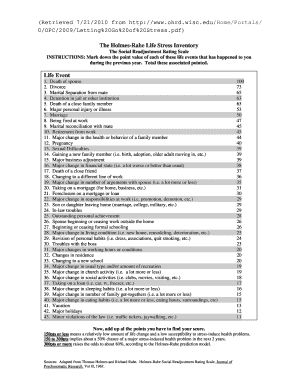
- Review the list of life events presented in the form. Each event is associated with a specific point value. Take a moment to reflect on your experiences over the past year.
- Mark down the point value for each relevant life event that you have experienced in the last year. Be sure to note all applicable events.
- Once you have completed marking your events, calculate the total points by adding up the values associated with each marked life event.
- Interpret your total score according to the provided guidelines. A score of 150 points or less indicates a relatively low susceptibility to stress-related health issues.
- If necessary, save the completed form to your device for future reference. You can also download, print, or share the form with others as needed.
Start filling out your Edu/Home/Portals/ form online today to gain insights into your life changes and stress levels.
The Mastery Connect Student Portal gives you access to class resources directly from your teacher.