Loading
Get Domovnica Online
How it works
-

Open form follow the instructions
-

Easily sign the form with your finger
-

Send filled & signed form or save
How to fill out the Domovnica Online online
This guide provides clear, step-by-step instructions for completing the Domovnica Online form. Whether you are familiar with legal documents or new to this process, our guide will support you in successfully filling out the form.
Follow the steps to complete the Domovnica Online form.
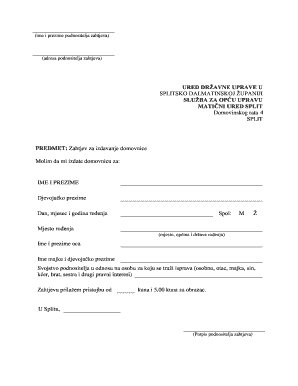
- Press the ‘Get Form’ button to access the Domovnica Online form and open it in your preferred editor.
- Begin filling in your personal details, starting with your first and last name in the designated fields. Ensure that the spelling is accurate.
- Provide your address in the specified section. Include street name, number, postal code, and city.
- In the subject section, clearly state your request for the issuance of the Domovnica. Use the appropriate phrases to communicate this.
- Indicate the name of the person for whom the Domovnica is being requested. Enter their full name accurately in the provided field.
- Include your father's full name in the specified area, ensuring that it matches official documents.
- List any relevant legal interests or relationships, such as siblings or other family members, if applicable. This may assist in your request.
- Confirm the payment information by indicating the fee for the form, which may include the amount specified.
- Complete the form with your signature in the designated area to validate your request.
- After filling out all sections accurately, review the information for any errors. Once confirmed, you can save your changes, download, print, or share the completed form.
Take the first step and fill out your Domovnica Online form now for a smooth application process.
Croatian passports are not renewed. You must apply for a new passport after your old one expires.