Loading
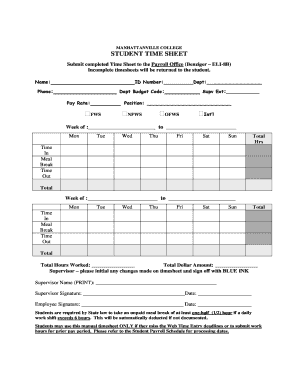
Get Student Timesheet Blankx - Examples Of Student Work
How it works
-

Open form follow the instructions
-

Easily sign the form with your finger
-

Send filled & signed form or save
How to fill out the Student Timesheet Blankx - Examples Of Student Work online
This guide provides comprehensive instructions for accurately completing the Student Timesheet Blankx - Examples Of Student Work document online. Following these steps ensures your submission is thorough and compliant with payroll requirements.
Follow the steps to accurately complete your timesheet online.
- Click ‘Get Form’ button to obtain the form and open it in the editor.
- Begin by filling in your name in the designated area, ensuring it reflects your official documentation.
- Enter your student ID number in the provided field for identification purposes.
- Specify the department you are affiliated with, ensuring accuracy for payroll classification.
- Provide your phone number, allowing for any necessary communication regarding your timesheet.
- Fill in the department budget code; this information is vital for processing your pay correctly.
- Indicate your pay rate, which should match the terms of your employment.
- Select your position by checking the appropriate box — FWS, NFWS, OFWS, or Int'l — depending on your work status.
- Provide your supervisor’s extension number for contact purposes.
- For the week of work, enter the date range at the top. Fill in each day of the week with your hours worked.
- Record your time in and out for each day, including any meal breaks taken.
- Sum the total hours worked for the week, ensuring accuracy.
- Calculate the total dollar amount earned based on the hours worked and your pay rate.
- Your supervisor must initial any changes made to the timesheet and sign off in blue ink.
- Both you and your supervisor need to print your names and provide signatures along with the date.
- Finally, review your completed timesheet for any omissions or errors before submitting.
Complete and submit your Student Timesheet Blankx online today for timely payroll processing.
Get form
Experience a faster way to fill out and sign forms on the web. Access the most extensive library of templates available.
ing to legislation, timekeeping remains ultimately the employers' obligation. So, following the FLSA, even when employees have failed to submit their timesheets or keep track of their time, the employer must pay them for hours worked when their paycheck is due.
Get This Form Now!
Use professional pre-built templates to fill in and sign documents online faster. Get access to thousands of forms.