Loading
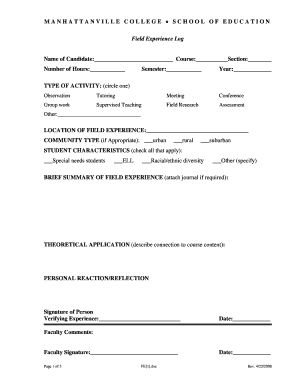
Get Manhattanville Field Experience Log
How it works
-

Open form follow the instructions
-

Easily sign the form with your finger
-

Send filled & signed form or save
How to fill out the Manhattanville Field Experience Log online
This guide provides step-by-step instructions on how to fill out the Manhattanville Field Experience Log online. Whether you are a first-time user or familiar with digital forms, this comprehensive guide will help you navigate through the process with ease.
Follow the steps to successfully complete your log online.
- Press the ‘Get Form’ button to access the Manhattanville Field Experience Log and open it in the digital editor.
- Begin by inputting your name, course, section, number of hours, semester, and year at the top of the form. Ensure all sections are completed accurately to avoid any issues later.
- In the 'Type of Activity' section, circle the applicable option that describes your field experience, such as observation, tutoring, or supervised teaching.
- Provide the location of your field experience, including the name of the institution and details such as the grade level or type of students you worked with.
- Select the community type from the options listed: urban, rural, or suburban, depending on where your experience took place.
- In the 'Student Characteristics' section, check all that apply to the students you interacted with, including options for special needs and racial/ethnic diversity.
- Write a brief summary of your field experience. If your assignment requires, attach any journal entries as supplementary information.
- Describe the theoretical applications related to your course. This will show how your experience connects with your academic studies.
- Include your personal reflection or reaction to the experience. This is an opportunity for you to articulate your thoughts and insights gained during your fieldwork.
- Ensure you have a signature from the person verifying your experience, along with the date. This step is crucial for validating your log.
- Finalize the form by saving your changes, then download or print a copy of the log for your records. If required, share the log with your professor or relevant parties as directed.
Complete your Manhattanville Field Experience Log online today to ensure your experiences are properly documented.
A deed is a binding document in a court of law only after it is filed in the public record by a local government official who is tasked with maintaining documents. The signing of a deed must be notarized. Some states also require witnesses.
Industry-leading security and compliance
US Legal Forms protects your data by complying with industry-specific security standards.
-
In businnes since 199725+ years providing professional legal documents.
-
Accredited businessGuarantees that a business meets BBB accreditation standards in the US and Canada.
-
Secured by BraintreeValidated Level 1 PCI DSS compliant payment gateway that accepts most major credit and debit card brands from across the globe.