Loading
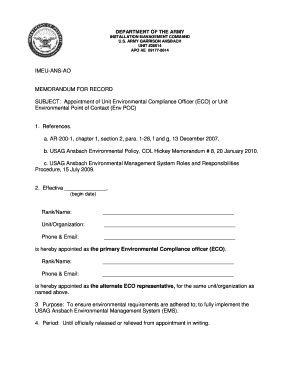
Get Army Appointment Letter
How it works
-

Open form follow the instructions
-

Easily sign the form with your finger
-

Send filled & signed form or save
How to fill out the Army Appointment Letter online
This guide provides a comprehensive overview of how to effectively fill out the Army Appointment Letter online. The steps outlined here will help you navigate each section of the form with clarity and confidence.
Follow the steps to complete the Army Appointment Letter.
- Click ‘Get Form’ button to obtain the form and open it in the editor.
- Enter the effective date in the designated field marked 'Effective ____________' indicating the start of the appointment.
- In the 'Rank/Name' section, input the full rank and name of the primary Environmental Compliance Officer (ECO). Ensure the spelling is accurate.
- Next, provide the unit or organization name in the 'Unit/Organization' field to clearly identify the officer's affiliation.
- Fill in the 'Phone & Email' section with the primary ECO’s contact information for correspondence and clarifications.
- In the next section, repeat the process to appoint the alternate ECO representative by entering their rank, name, phone, and email in the appropriate placeholders.
- Review the duties outlined for the ECO and ensure the appointee understands their responsibilities regarding environmental compliance and management.
- Verify that all sections of the document have been filled out completely and accurately to avoid any delays in processing.
- Once all fields are complete, save your changes to the document. You can then choose to download, print, or share the appointment letter as needed.
Complete your documents online efficiently and accurately today.