Loading
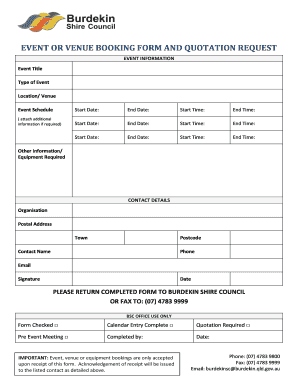
Get Quotation Of Booking A Venue
How it works
-

Open form follow the instructions
-

Easily sign the form with your finger
-

Send filled & signed form or save
How to fill out the Quotation Of Booking A Venue online
This guide provides a detailed overview of how to accurately fill out the Quotation Of Booking A Venue form online. By following these steps, you will ensure that all necessary information is provided for a successful booking request.
Follow the steps to complete the Quotation Of Booking A Venue form
- Click the ‘Get Form’ button to access the document and open it in your preferred editor.
- Begin by entering the event information. Provide the event title, type of event, and the location or venue. Additionally, specify the event schedule, including start and end dates and times.
- If additional dates, times, or information are necessary for your booking, use the designated space to include this information. Mention all required details or equipment needed for the event.
- Next, fill out your contact details. Include the name of the organization, postal address, town, postcode, contact name, phone number, and email address.
- Make sure to sign and date the form to confirm the information provided is accurate and complete.
- Once you have filled out all sections, review the form for any errors or missing information before submission.
- Finally, save your changes, download the document, and print it if necessary. You may also share the form by returning the completed document to Burdekin Shire Council, either by faxing or emailing as specified.
Complete your Quotation Of Booking A Venue form online today and secure your venue booking!
Place the important details in the event quotation, including the items needed and their respective prices. Properly allocate the number of pieces that you should provide per item. Get the sum of the prices of all the items so you can identify the total amount of the transaction.