Loading
Get Tka Tsl Harvest Completion And Deposit Release Bformb
How it works
-

Open form follow the instructions
-

Easily sign the form with your finger
-

Send filled & signed form or save
How to fill out the TKA TSL HARVEST COMPLETION AND DEPOSIT RELEASE BFORMb online
Filling out the TKA TSL Harvest Completion and Deposit Release BFORMb online is a crucial process for licensees wishing to manage their timber sale licenses efficiently. This guide provides clear instructions to help users navigate each section of the form and submit their requests accurately.
Follow the steps to complete the form successfully.
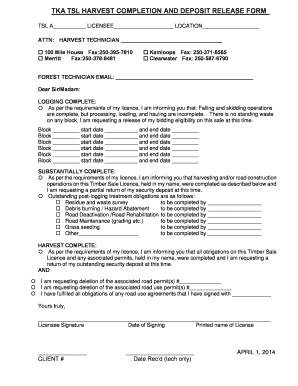
- Press the ‘Get Form’ button to access the TKA TSL Harvest Completion and Deposit Release BFORMb and open it in your preferred online document editor.
- Fill in the required fields at the top of the form, including your TSL license number, licensee name, and the location related to the timber sale.
- Direct your attention to the section labeled 'ATTN: Harvest Technician' and provide the name of the technician you are reporting to along with their fax number, ensuring accuracy for future correspondence.
- Indicate the status of your logging activities by checking the appropriate box: 'Logging Complete', 'Substantially Complete', or 'Harvest Complete'.
- For 'Logging Complete', provide details for each block, including the block number, start date, and end date. Repeat the process for each relevant block, making sure to check the box if there is no standing waste.
- In the 'Substantially Complete' section, highlight any outstanding post-logging treatment obligations using the checkboxes provided, and specify completion details as necessary.
- If your harvesting is complete, complete the relevant section to request a return of your security deposit by checking the boxes for any associated road permits you wish to delete.
- At the bottom of the form, ensure you sign the document, provide the date of signing, and print your name clearly for verification.
- Fill in any additional information requested, such as your client number and the date received, which is for office use only.
- After reviewing all entries for accuracy, save your changes, download a copy for your records, print if necessary, or share the completed form as required.
Take control of your timber sale processes by filling out the TKA TSL Harvest Completion and Deposit Release BFORMb online today.
Is the hyphen in a ZIP+4® ZIP Code™ number required? Yes, when using a ZIP+4 ZIP Code, the number must consist of five digits, a hyphen (or dash), and four digits.
Industry-leading security and compliance
US Legal Forms protects your data by complying with industry-specific security standards.
-
In businnes since 199725+ years providing professional legal documents.
-
Accredited businessGuarantees that a business meets BBB accreditation standards in the US and Canada.
-
Secured by BraintreeValidated Level 1 PCI DSS compliant payment gateway that accepts most major credit and debit card brands from across the globe.