Loading
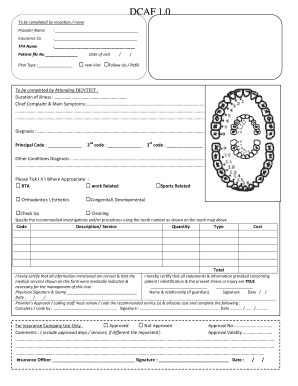
Get To Be Completed By Reception / Nurse - Nextcare
How it works
-

Open form follow the instructions
-

Easily sign the form with your finger
-

Send filled & signed form or save
How to fill out the To Be Completed By Reception / Nurse - Nextcare online
Completing the To Be Completed By Reception / Nurse - Nextcare form can ensure accurate patient information is recorded efficiently. This guide will provide clear, step-by-step instructions to assist you in filling out each section of the form correctly.
Follow the steps to accurately complete the form.
- Click the ‘Get Form’ button to obtain the form and open it in your designated editor.
- Begin with the first section, 'Provider Name'. Enter the name of the healthcare provider clearly in the provided space.
- In the 'Insurance Co' field, input the name of the patient's insurance company.
- Fill in the 'TPA Name' section with the name of the Third Party Administrator, if applicable.
- Locate the 'Patient file No' field and enter the unique identifier for the patient's file. Then, select the 'Plan Type' relevant to the patient.
- Record the 'Date of visit' by entering the day, month, and year, indicating whether it is a new visit or a follow-up/refill.
- Proceed to the section labeled 'To be completed by Attending Dentist'. Indicate the 'Duration of illness' followed by the 'Chief Complaint & Main Symptoms' detailing the patient’s primary concerns.
- Input the 'Diagnosis' as well as the principal and additional diagnosis codes as required.
- In the 'Other Conditions Diagnosis' section, provide details of any other relevant conditions.
- Check the appropriate boxes that apply to the patient's condition, such as 'RTA', 'Work Related', etc.
- Specify recommended investigations and procedures, including the tooth number, service descriptions, quantities, and cost in the respective fields.
- Complete the certification statement by ensuring all information is correct and signing in the designated areas for the physician and other required staff.
- After completing the form, save any changes, and consider downloading, printing, or sharing it as needed.
Complete your document online to ensure efficient processing and accurate record-keeping.
Cancellation requests may be submitted in the following ways: Website: nextcare.com/contact-us/ Online: Login into your online account at nextcare.com. Email: mdp@nextcare.com. Fax: 480-353-2240. Call: 800-605-9046. Clinic: Go to your local clinic and fill out the Advantage cancellation form.
Industry-leading security and compliance
US Legal Forms protects your data by complying with industry-specific security standards.
-
In businnes since 199725+ years providing professional legal documents.
-
Accredited businessGuarantees that a business meets BBB accreditation standards in the US and Canada.
-
Secured by BraintreeValidated Level 1 PCI DSS compliant payment gateway that accepts most major credit and debit card brands from across the globe.