Loading
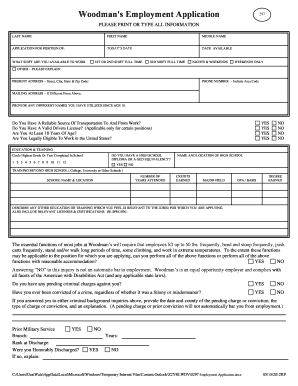
Get Woodmans Employment Application - Jobapplicationform
How it works
-

Open form follow the instructions
-

Easily sign the form with your finger
-

Send filled & signed form or save
How to fill out the Woodmans Employment Application - Jobapplicationform online
Filling out your employment application online can seem daunting, but with the right guidance, you can complete it confidently. This guide provides clear, step-by-step instructions to help you fill out the Woodmans Employment Application accurately and efficiently.
Follow the steps to successfully complete your application.
- Click the ‘Get Form’ button to obtain the application form and open it in your editor.
- Begin by entering your last name, first name, and middle name in the specified fields. These details are crucial for your application.
- Indicate the position you are applying for, the date of your application, and your availability for work shifts including first, second, third shift, or weekends.
- Provide your current address, including street, city, state, and zip code. Also, include a phone number with the area code.
- If you have a different mailing address, enter that information in the designated field.
- List any other names you have been known by since turning 18 years of age.
- Indicate whether you have reliable transportation, a valid driver’s license (if needed), and confirm you are at least 18 years of age and legally eligible to work in the United States by selecting 'Yes' or 'No'.
- Circle the highest grade or year completed in school and indicate whether you have a high school diploma or GED equivalency.
- Fill in the details of your education and training, including institutions attended, years attended, credits earned, major fields, and degrees.
- Answer the physical capability question regarding the essential functions of the job and whether you can perform them, with or without reasonable accommodation.
- Provide information about any pending criminal charges or prior convictions, including dates and explanations if applicable.
- List your work experience, starting with the most recent job. Include details such as employer name, job title, location, reason for leaving, and job duties.
- Indicate whether Woodman's may communicate with your present employer, if you have worked for them before, or if you have done any volunteer work.
- Provide references, listing their names, addresses, and phone numbers.
- Review all your entries for accuracy, then provide your signature and the date to certify that all information is true and complete.
- Finally, save your changes. You may choose to download, print, or share the completed application form as needed.
Complete your documents online today and take the first step toward your new career.
Search for "Woodman's" within the Ibotta app. Select Woodman's from the results. Select the "Link Woodman's Shopper ID Number" button at the top of the screen. Select Link Account on the next screen. Enter in your Shopper ID (learn more about Shopper ID), and select "Add Card."
Industry-leading security and compliance
US Legal Forms protects your data by complying with industry-specific security standards.
-
In businnes since 199725+ years providing professional legal documents.
-
Accredited businessGuarantees that a business meets BBB accreditation standards in the US and Canada.
-
Secured by BraintreeValidated Level 1 PCI DSS compliant payment gateway that accepts most major credit and debit card brands from across the globe.