Loading
Get Sixpika
How it works
-

Open form follow the instructions
-

Easily sign the form with your finger
-

Send filled & signed form or save
How to fill out the Sixpika online
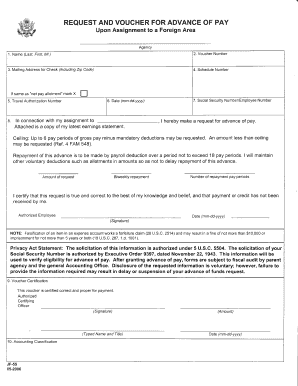
This guide provides step-by-step instructions on how to accurately complete the Sixpika form online. Designed for users with varying experience levels, this resource aims to simplify the process of submitting a request for an advance of pay upon assignment to a foreign area.
Follow the steps to successfully complete the Sixpika form.
- Press the ‘Get Form’ button to access the Sixpika form and open it in your preferred document editor.
- In the first field, enter your name in the format of last name, first name, and middle initial. Ensure the spelling is correct to avoid processing delays.
- Enter the voucher number in the designated field. This number is crucial for tracking your form.
- Fill in your mailing address for receiving the check, including your zip code. Double-check this information for accuracy.
- Input your schedule number. If this is the same as your net pay allotment, mark the appropriate box to indicate this.
- Provide your travel authorization number in the provided space.
- Enter the date in the format mm-dd-yyyy to document when the form is being filled out.
- Attach a copy of your latest earnings statement, which is required for your request.
- Input your Social Security number or employee number. Ensure that this information is entered correctly.
- Indicate the amount you are requesting for advance pay, ensuring it does not exceed the set ceilings as outlined.
- Specify the number of repayment pay periods and the amount that will be deducted from each pay period.
- Review the statement affirming that your request is true and correct to the best of your knowledge and belief.
- Sign and date the form to authorize your request.
- Finally, if required, include the certification by the authorized certifying officer, along with their typed name and title.
- Once all fields are complete, save your changes, download the form, and if necessary, print or share it for submission.
Complete your documents online efficiently by following this guide.
If you're asking whether you need a lawyer to draft a contract, legally, the answer is no. Anyone can draft a contract on their own and as long as the elements above are included and both parties are legally competent and consent to the agreement, it is generally lawful.
Industry-leading security and compliance
US Legal Forms protects your data by complying with industry-specific security standards.
-
In businnes since 199725+ years providing professional legal documents.
-
Accredited businessGuarantees that a business meets BBB accreditation standards in the US and Canada.
-
Secured by BraintreeValidated Level 1 PCI DSS compliant payment gateway that accepts most major credit and debit card brands from across the globe.