Loading
Form preview
  • US Legal Forms
  • Form Library
  • More Forms
  • More Uncategorized Forms
  • Psfs Patient Specific Functional Scale

Get Psfs Patient Specific Functional Scale

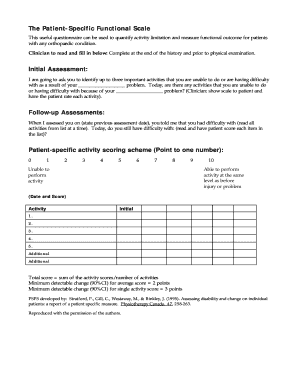
The Patient-Specific Functional Scale This useful questionnaire can be used to quantify activity limitation and measure functional outcome for patients with any orthopaedic condition. Clinician to read and fill in below Complete at the end of the history and prior to physical examination. Initial Assessment I am going to ask you to identify up to three important activities that you are unable to do or are having difficulty with as a result of your problem. Today are there any activities that you are unable to do or having difficulty with because of your problem Clinician show scale to patient and have the patient rate each activity. Follow-up Assessments When I assessed you on state previous assessment date you told me that you had difficulty with read all activities from list at a time. Today do you still have difficulty with read and have patient score each item in the list Patient-specific activity scoring scheme Point to one number Unable to perform activity Able to perform activit....

How it works

  1. Open form

    Open form follow the instructions

  2. Easily sign form

    Easily sign the form with your finger

  3. Share form

    Send filled & signed form or save

How to fill out the Psfs Patient Specific Functional Scale online

The Psfs Patient Specific Functional Scale is a valuable tool designed to assess functional limitations in individuals with orthopedic issues. This guide provides clear instructions on how to complete the form online, ensuring an efficient and user-friendly experience.

Follow the steps to complete the Psfs Patient Specific Functional Scale online

  1. Click ‘Get Form’ button to access the form and open it in your preferred editor.
  2. Begin by identifying up to three important activities that you struggle with due to your orthopedic condition. Clearly state the specific problem you are facing related to these activities.
  3. Once you have noted the activities, assign a score to each based on the provided scoring scheme. The scale ranges from 0, indicating you are unable to perform the activity, to 10, meaning you can perform it at the same level as before your problem.
  4. Mark the date of your assessment next to each activity listed. This helps trace any changes in functionality over time.
  5. After completing the initial scoring, look back at any previous assessments and rate your current status concerning the previously identified difficulties. Adjust scores if necessary.
  6. Calculate the total score by summing the individual activity scores and dividing by the number of activities you assessed. This provides an average score for your functional ability.
  7. Review all the information you have entered and ensure it is accurate before proceeding. Once satisfied, you can save your changes, download, print, or share the form as required.

Complete your form online today to accurately assess your functional progress.

Get form

Experience a faster way to fill out and sign forms on the web. Access the most extensive library of templates available.
Get form

Related content

Minimum important differences for the...
Objectives: To investigate the minimum important difference (MID) of the Patient-Specific...
Learn more
The Patient-Specific Functional Scale
Please read the following and complete. Please identify up to three important activities...
Learn more

Related links form

FL Womens Care New Patient History 2019 FL RMA Male Intake Form 2017 FL RMA Male Intake Form FL Quality Care Animal Hospitals Boarding Agreement 2015

Questions & Answers

Get answers to your most pressing questions about US Legal Forms API.

Contact support

PSFS Patient-specific Patients nominate 3 to 5 activities that they are unable to do or having difficulty do- ing because of their injury or problem. These activities are rated on an 11-point scale, where 0 is unable to perform the activity and 10 is able to perform the activity at preinjury level.

This useful questionnaire can be used to quantify activity limitation and measure functional outcome for patients with any orthopaedic condition.

The LEFS can be used to evaluate the functional impairment of a patient with a disorder of one or both lower extremities. It can be used to monitor the patient over time and to evaluate the effectiveness of an intervention. The columns on the scale are summed to get a total score. The maximum score is 80.

The Financial Sector Professionals (PSF) category encompasses 3 sub-groups, classified and defined as follows, depending on the type of business conducted and the nature of services provided.

The Patient-Specific Functional Scale (PSFS) was designed. to provide clinicians with a valid, reliable, responsive, and. efficient outcome measure that would be easy to use and. applicable to a large number of clinical presentations.29 As a.

Total Patient-Specific Functional Scale (PSFS) score=10; higher scores represent higher levels of function. Total Lower Extremity Functional Scale (LEFS) score=80; higher scores represent higher levels of function.

The PSFS assesses functional ability to complete specific activities.

Get This Form Now!

Use professional pre-built templates to fill in and sign documents online faster. Get access to thousands of forms.
Get form
If you believe that this page should be taken down, please follow our DMCA take down processhere.

Industry-leading security and compliance

US Legal Forms protects your data by complying with industry-specific security standards.
  • In businnes since 1997
    25+ years providing professional legal documents.
  • Accredited business
    Guarantees that a business meets BBB accreditation standards in the US and Canada.
  • Secured by Braintree
    Validated Level 1 PCI DSS compliant payment gateway that accepts most major credit and debit card brands from across the globe.
Get Psfs Patient Specific Functional Scale
Get form
  • Adoption
  • Bankruptcy
  • Contractors
  • Divorce
  • Home Sales
  • Employment
  • Identity Theft
  • Incorporation
  • Landlord Tenant
  • Living Trust
  • Name Change
  • Personal Planning
  • Small Business
  • Wills & Estates
  • Packages A-Z
  • Affidavits
  • Bankruptcy
  • Bill of Sale
  • Corporate - LLC
  • Divorce
  • Employment
  • Identity Theft
  • Internet Technology
  • Landlord Tenant
  • Living Wills
  • Name Change
  • Power of Attorney
  • Real Estate
  • Small Estates
  • Wills
  • All Forms
  • Forms A-Z
  • Form Library
  • Legal Hub
  • About Us
  • Help Portal
  • Legal Resources
  • Blog
  • Affiliates
  • Contact Us
  • Delete My Account
  • Site Map
  • Industries
  • Forms in Spanish
  • Localized Forms
  • State-specific Forms
  • Forms Kit
  • Real Estate Handbook
  • All Guides
  • Notarize
  • Incorporation services
  • For Consumers
  • For Small Business
  • For Attorneys
  • USLegal
  • FormsPass
  • pdfFiller
  • signNow
  • altaFlow
  • DocHub
  • Instapage
Form Packages
  • Adoption
  • Bankruptcy
  • Contractors
  • Divorce
  • Home Sales
  • Employment
  • Identity Theft
  • Incorporation
  • Landlord Tenant
  • Living Trust
  • Name Change
  • Personal Planning
  • Small Business
  • Wills & Estates
  • Packages A-Z
Form Categories
  • Affidavits
  • Bankruptcy
  • Bill of Sale
  • Corporate - LLC
  • Divorce
  • Employment
  • Identity Theft
  • Internet Technology
  • Landlord Tenant
  • Living Wills
  • Name Change
  • Power of Attorney
  • Real Estate
  • Small Estates
  • Wills
  • All Forms
  • Forms A-Z
  • Form Library
Customer Service
  • Legal Hub
  • About Us
  • Help Portal
  • Legal Resources
  • Blog
  • Affiliates
  • Contact Us
  • Delete My Account
  • Site Map
  • Industries
  • Forms in Spanish
  • Localized Forms
  • State-specific Forms
  • Forms Kit
Legal Guides
  • Real Estate Handbook
  • All Guides
Prepared for you
  • Notarize
  • Incorporation services
Our Customers
  • For Consumers
  • For Small Business
  • For Attorneys
Our Sites
  • USLegal
  • FormsPass
  • pdfFiller
  • signNow
  • altaFlow
  • DocHub
  • Instapage
Social Media
Call us now toll free:
+1 833 426 79 33
As seen in:
© Copyright 1999-2026 airSlate Legal Forms, Inc. 3720 Flowood Dr, Flowood, Mississippi 39232
  • Your Privacy Choices
  • Terms of Service
  • Privacy Notice
  • Content Takedown Policy
  • Bug Bounty Program