Loading
Get Reactivation Request Form - Bronx Community College - Bcc Cuny
How it works
-

Open form follow the instructions
-

Easily sign the form with your finger
-

Send filled & signed form or save
How to fill out the REACTIVATION REQUEST FORM - Bronx Community College - Bcc Cuny online
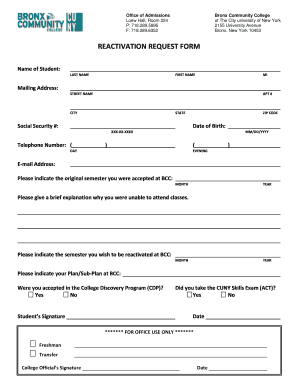
The reactivation request form is a crucial document for students wishing to resume their studies at Bronx Community College. This guide will provide you with clear, step-by-step instructions on how to effectively complete the form online.
Follow the steps to successfully complete your reactivation request.
- Click ‘Get Form’ button to obtain the form and open it in the editor.
- Enter your name in the designated fields for last name, first name, and middle initial (MI). Ensure that your names are spelled correctly and match your identification documents.
- Provide your mailing address, filling in your street name, apartment number (if applicable), city, state, and ZIP code. Make sure your address is current to ensure proper communication from the college.
- Input your Social Security number using the format XXX-XX-XXXX. This is important for identification purposes.
- Fill in your date of birth in the MM/DD/YYYY format. This data helps verify your identity.
- Provide your telephone number for both daytime and evening contacts. Make sure to double-check the accuracy of the numbers entered.
- Enter your email address clearly and correctly, as this is how the college can reach you regarding your application.
- Indicate the original semester you were accepted at Bronx Community College by filling out the month and year fields.
- In the space provided, give a brief explanation of why you were unable to attend classes. Be concise yet informative.
- State the semester you wish to be reactivated by filling in the respective month and year.
- Indicate your plan or sub-plan at Bronx Community College, ensuring you select the appropriate options related to your field of study.
- State whether you were accepted into the College Discovery Program (CDP) by selecting 'Yes' or 'No'.
- Review your inputs and sign the form where indicated. This signature confirms that all information provided is accurate.
- Indicate if you took the CUNY Skills Exam (ACT) by selecting 'Yes' or 'No'.
- Finally, ensure to provide the date on which you complete the form.
- Once you have filled out all sections of the form, you can save changes, download, print, or share the completed form as needed.
Take the next step in your education and complete your reactivation request form online today.
Satisfactory Academic Progress ATTEMPTED CREDITSMINIMUM GPA.5 to 121.5013 to 241.7525 – Upwards2.00
Industry-leading security and compliance
US Legal Forms protects your data by complying with industry-specific security standards.
-
In businnes since 199725+ years providing professional legal documents.
-
Accredited businessGuarantees that a business meets BBB accreditation standards in the US and Canada.
-
Secured by BraintreeValidated Level 1 PCI DSS compliant payment gateway that accepts most major credit and debit card brands from across the globe.