Loading
Get Blue Jay Wireless
How it works
-

Open form follow the instructions
-

Easily sign the form with your finger
-

Send filled & signed form or save
How to fill out the Blue Jay Wireless online
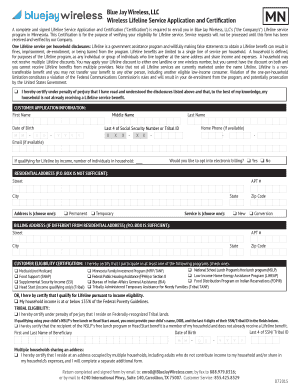
Completing the Blue Jay Wireless Lifeline Service Application and Certification is essential for enrolling in their Lifeline service program in Minnesota. This guide will provide you with clear, step-by-step instructions to ensure the application process is smooth and straightforward.
Follow the steps to complete your application accurately.
- Press the ‘Get Form’ button to acquire the Lifeline Service Application and Certification. This will allow you to open the necessary form in your preferred document editor.
- Fill in the 'Customer Application Information' section. Enter your first name, middle name, last name, date of birth, home phone (if available), and the last four digits of your Social Security Number or Tribal ID.
- Indicate if you qualify for Lifeline due to income by stating the number of individuals in your household. You may also opt into electronic billing by selecting 'Yes' or 'No'.
- Provide your residential address, ensuring it is a physical address (P.O. Box is not acceptable). Include your apartment number, street, city, state, zip code, and specify whether the address is permanent or temporary.
- If your billing address is different from your residential address, fill out the billing address section with the same required details.
- In the 'Customer Eligibility Certification' section, check the box that applies to you based on your participation in government assistance programs or if you qualify based on income.
- If applicable, complete the 'Tribal Eligibility' section if you reside on Federally recognized Tribal lands, and provide required information for your child if qualifying through NSLP or Head Start.
- Complete any additional certifications by checking each applicable box to confirm your understanding and compliance with Lifeline requirements.
- Sign and date the application at the bottom. Ensure the signature section is completed accurately.
- Return your completed and signed application via email, fax, or mail as specified in the form, ensuring proper submission for processing.
Start filling out your Blue Jay Wireless application online today to access essential wireless services!
Easy Wireless provides mobile telecommunications services using the geographic areas covered by the Nationwide Sprint Network footprint.