Loading
Get Trust Receipt
How it works
-

Open form follow the instructions
-

Easily sign the form with your finger
-

Send filled & signed form or save
How to fill out the Trust Receipt online
Filling out a Trust Receipt online is a straightforward process that allows users to manage their financial obligations efficiently. This guide provides step-by-step instructions to help you navigate the form and ensure accuracy in your submission.
Follow the steps to complete the Trust Receipt form online.
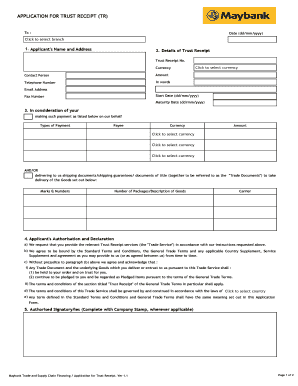
- Click the 'Get Form' button to access the Trust Receipt form. This will open the document for you to begin filling it out.
- Enter the date in the format of dd/mm/yyyy. This should reflect the date on which you are submitting the Trust Receipt.
- Select the relevant branch by clicking to choose from the provided options.
- Fill out the applicant's name and address, ensuring to provide the full legal name and corresponding address for accurate identification.
- Complete the details of the Trust Receipt, including the Trust Receipt number, currency, contact person, amount, telephone number, email address, start date, fax number, and maturity date, specifying each in its respective field.
- In the payment section, list the types of payment, the currency, payee information, and amounts, ensuring clarity in each detail provided.
- Provide information regarding the Goods, including marks & numbers, number of packages, description, and the name of the carrier.
- Review and complete the applicant's authorisation and declaration, ensuring to understand and agree to the terms stated, including acknowledging that the trade documents are pledges held in trust.
- Add your authorized signatory's name and company stamp if required, as this serves to validate the submission.
- Once all fields are accurately completed, save your changes, and choose whether to download, print, or share the completed form as needed.
Complete your documents online today for a seamless submission experience.
Banks issue Letter of Credit or LC to the seller or seller's bank to guarantee a payment or a specific amount at a certain period of time.