Loading
Get Upper Columbia Conference
How it works
-

Open form follow the instructions
-

Easily sign the form with your finger
-

Send filled & signed form or save
How to fill out the Upper Columbia Conference online
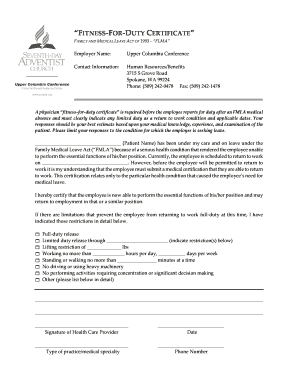
Filling out the Upper Columbia Conference fitness-for-duty certificate online is a crucial step in ensuring compliance with the Family and Medical Leave Act. This guide provides clear instructions on how to accurately complete the form, ensuring that your submission is timely and meets all requirements.
Follow the steps to successfully complete the online form.
- Press the ‘Get Form’ button to access the fitness-for-duty certificate. This will allow you to open the document in the designated editing tool.
- Begin by entering the employer name, Upper Columbia Conference, in the appropriate field. This identifies the organization associated with the certification.
- Provide your contact information in the specified section, including Human Resources/Benefits, address, phone number, and fax number, ensuring it is current and accurate.
- In the patient name section, clearly write the name of the employee who has been on medical leave. This identifies the individual for whom the certification is being completed.
- After confirming the patient has been under your care, document the start date of their leave and their scheduled return-to-work date in the designated spaces. This is vital for tracking their medical leave.
- Ensure you certify that the employee is able to perform the essential functions of their position. If there are limitations or restrictions, detail them in the specified section, using precise language.
- If applicable, specify any lifting or work hour restrictions, or any other limitations that may affect the employee’s return to work. This includes any specific conditions such as no driving or operating machinery.
- Once all sections are completed, review the form carefully to ensure all information is accurate and complete.
- After confirming that the form is filled out correctly, you can save changes, download a copy for your records, print the form, or share it as needed.
Complete your documents online today to ensure compliance and support the health of your employees.