Loading
Form preview
  • US Legal Forms
  • Other Templates
  • More Forms
  • More Uncategorized Forms
  • Cell Vocabulary Review

Get Cell Vocabulary Review

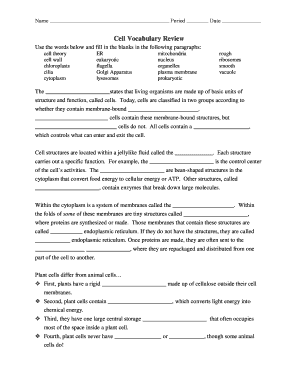
Name Period Date Cell Vocabulary Review Use the words below and fill in the blanks in the following paragraphs: cell theory cell wall chloroplasts cilia cytoplasm ER eukaryotic flagella Golgi Apparatus.

How it works

  1. Open form

    Open form follow the instructions

  2. Easily sign form

    Easily sign the form with your finger

  3. Share form

    Send filled & signed form or save

How to fill out the Cell Vocabulary Review online

The Cell Vocabulary Review is an essential tool for understanding key concepts related to cellular biology. This guide will provide you with detailed, step-by-step instructions on how to effectively complete the form online.

Follow the steps to fill out the form correctly.

  1. Click ‘Get Form’ button to access the Cell Vocabulary Review form. This action will open the form in your online editor.
  2. Begin by filling in your name in the designated section at the top of the form. This identifies you as the person completing the review.
  3. Next, provide the period and date in the respective fields. This helps track when the review was completed.
  4. Proceed to fill in the blanks in the provided paragraphs. Use the vocabulary words given below the statement to complete each sentence meaningfully, selecting terms relevant to cell structure and function.
  5. After completing all sections, review your answers for accuracy. Ensure that each blank is filled appropriately based on your understanding of cell biology.
  6. Finally, save your changes, and choose to download, print, or share the completed form as needed to submit your work.

Get started on completing the Cell Vocabulary Review online today!

Get form

Experience a faster way to fill out and sign forms on the web. Access the most extensive library of templates available.
Get form

Related content

Exhaustion may not be in the human B cell...
Sep 25, 2019 — T cells in this functional state are termed "exhausted" and T cell...
Learn more
Cells Vocabulary - Amazon S3
Cells Vocabulary List & Definitions. Term. Definition. Tissue. The mass of like cells in...
Learn more
Skill with Polysemous Words: A Measurement of the...
bibliography of vocabulary studies and Clifford's (1978) review of. Edward ... action had...
Learn more

Related links form

CA SISC Defined Benefit Plan Request For Benefit Payment 2018 CO Construction Industry Training Council Electrician Work Report 2015 CO Construction Industry Training Council Plumber Work Report 2015 CO Construction Industry Training Council Carpenter Work Report 2015

Questions & Answers

Get answers to your most pressing questions about US Legal Forms API.

Contact support

To export your bookmarks in Safari, select File, Export Bookmarks. When you click on Save, Safari will create a web page containing links to all the sites you have bookmarked. You can then email this webpage to your students and they can use the links on it as a starting point for researching a topic.

Open the Bookmark Manager in Google Chrome (see above). Hold Shift, Ctrl, or Command while tapping the bookmarks you want to export. Right-click the selected bookmarks and select Copy from the pop-up menu. Paste the bookmarks into an email or chat with your intended recipient.

Add a bookmark On your computer, open Chrome. Go to the site you want to visit again in the future. To the right of the address bar, click Star .

Open Chrome's standard bookmark manager, open the specific folder or sub-folder whose contents you want to share, then in the right-hand pane just copy the icons of the web pages. Then paste into an email (this action will yield a list of URLs, not icons) and send.

Google Chrome To show Bookmarks in Chrome, click the icon with three horizontal bars in the top right corner to open the control panel. 2. In the control panel, hover over "Bookmarks" to display a second menu where you can click the "Show bookmarks bar" text to toggle the bar on or off.

How to Export and Save Your Chrome Bookmarks Open Chrome and click the icon with three vertical dots in the top-right corner. Then hover over Bookmarks. ... Next, click Bookmark manager. ... Then click the icon with three vertical dots. ... Next, click Export Bookmarks. ... Finally, choose a name and destination and click Save.

Export bookmarks from Chrome to another computer Launch Chrome on your PC or Mac. Click the menu icon to the right of the web address bar. Go to Bookmarks > Bookmark manager. Click the menu icon in the Bookmark manager. Choose "Export Bookmarks". Select a destination to save to, then hit "Save".

Add a bookmark: Select the text or object that you want to bookmark. Click the Insert tab, then Bookmark. Type a name for your bookmark, without spaces. Click Add. Go to a bookmark: Click the Insert tab, then Bookmark. Click the name of the bookmark you want to go to. Click Go To. ... Click the Insert tab, then Bookmark.

Get This Form Now!

Use professional pre-built templates to fill in and sign documents online faster. Get access to thousands of forms.
Get form
If you believe that this page should be taken down, please follow our DMCA take down processhere.
Get Cell Vocabulary Review
Get form
  • Adoption
  • Bankruptcy
  • Contractors
  • Divorce
  • Home Sales
  • Employment
  • Identity Theft
  • Incorporation
  • Landlord Tenant
  • Living Trust
  • Name Change
  • Personal Planning
  • Small Business
  • Wills & Estates
  • Packages A-Z
  • Affidavits
  • Bankruptcy
  • Bill of Sale
  • Corporate - LLC
  • Divorce
  • Employment
  • Identity Theft
  • Internet Technology
  • Landlord Tenant
  • Living Wills
  • Name Change
  • Power of Attorney
  • Real Estate
  • Small Estates
  • Wills
  • All Forms
  • Forms A-Z
  • Other Templates
  • Legal Hub
  • About Us
  • Help Portal
  • Legal Resources
  • Blog
  • Affiliates
  • Contact Us
  • Delete My Account
  • Site Map
  • Industries
  • Forms in Spanish
  • Localized Forms
  • State-specific Forms
  • Forms Kit
  • Real Estate Handbook
  • All Guides
  • Notarize
  • Incorporation services
  • For Consumers
  • For Small Business
  • For Attorneys
  • USLegal
  • FormsPass
  • pdfFiller
  • signNow
  • altaFlow
  • DocHub
  • Instapage
Form Packages
  • Adoption
  • Bankruptcy
  • Contractors
  • Divorce
  • Home Sales
  • Employment
  • Identity Theft
  • Incorporation
  • Landlord Tenant
  • Living Trust
  • Name Change
  • Personal Planning
  • Small Business
  • Wills & Estates
  • Packages A-Z
Form Categories
  • Affidavits
  • Bankruptcy
  • Bill of Sale
  • Corporate - LLC
  • Divorce
  • Employment
  • Identity Theft
  • Internet Technology
  • Landlord Tenant
  • Living Wills
  • Name Change
  • Power of Attorney
  • Real Estate
  • Small Estates
  • Wills
  • All Forms
  • Forms A-Z
  • Other Templates
Customer Service
  • Legal Hub
  • About Us
  • Help Portal
  • Legal Resources
  • Blog
  • Affiliates
  • Contact Us
  • Delete My Account
  • Site Map
  • Industries
  • Forms in Spanish
  • Localized Forms
  • State-specific Forms
  • Forms Kit
Legal Guides
  • Real Estate Handbook
  • All Guides
Prepared for you
  • Notarize
  • Incorporation services
Our Customers
  • For Consumers
  • For Small Business
  • For Attorneys
Our Sites
  • USLegal
  • FormsPass
  • pdfFiller
  • signNow
  • altaFlow
  • DocHub
  • Instapage
Social Media
Call us now toll free:
+1 833 426 79 33
As seen in:
© Copyright 1999-2026 airSlate Legal Forms, Inc. 17 Station Street, Suite 303, Brookline, MA 02445
  • Your Privacy Choices
  • Terms of Service
  • Privacy Notice
  • Content Takedown Policy
  • Bug Bounty Program