Loading
Get Department Of Labor Office Of Workers'' Compensation Programs ...
How it works
-

Open form follow the instructions
-

Easily sign the form with your finger
-

Send filled & signed form or save
How to fill out the Department Of Labor Office Of Workers' Compensation Programs Certification of Medical Necessity online
Completing the Certification of Medical Necessity for the Department Of Labor can be a straightforward process when you understand each section of the form. This guide will provide you with step-by-step instructions to ensure you fill out the form accurately and efficiently online.
Follow the steps to successfully complete the form online.
- Press the ‘Get Form’ button to obtain the necessary document and open it in your chosen editor.
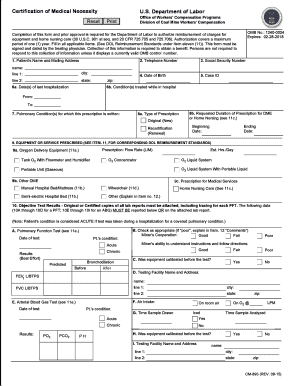
- Fill in the patient's name and mailing address. Ensure that you include all required components such as the name, street address, city, state, and zip code.
- Provide the patient's telephone number, social security number, and date of birth.
- Enter the case ID and the date(s) of the patient's last hospitalization.
- Outline the condition(s) treated during the hospitalization in the specified fields.
- Specify the pulmonary condition(s) for which this prescription is issued.
- Indicate whether the prescription is original or a recertification, and specify the requested duration for any durable medical equipment (DME) or home nursing care.
- List the equipment or services prescribed based on the guidelines provided, ensuring that you reference item 11 for DOL reimbursement standards.
- Attach all necessary objective test results. Remember to provide original or certified copies of lab reports related to the pulmonary function test.
- Fill in the physician/provider information, certifying that the prescribed services are necessary.
- Review the completed form for accuracy, and sign and date it to complete the submission.
- Save your changes and choose to download, print, or share the filled form as needed.
Take action now and start filing your documents online to ensure timely processing!
Injured Workers and Providers can check on the status of medical authorizations on the OWCP Web Bill Processing Portal. To speak with a Customer Service Representative regarding an authorization, you may call 844-493-1966, toll free. This number is available Monday to Friday, 8am to 8pm, EST.
Industry-leading security and compliance
US Legal Forms protects your data by complying with industry-specific security standards.
-
In businnes since 199725+ years providing professional legal documents.
-
Accredited businessGuarantees that a business meets BBB accreditation standards in the US and Canada.
-
Secured by BraintreeValidated Level 1 PCI DSS compliant payment gateway that accepts most major credit and debit card brands from across the globe.