Loading
Form preview
  • US Legal Forms
  • Form Library
  • More Forms
  • More Uncategorized Forms
  • Aascf Waiverrelease

Get Aascf Waiverrelease

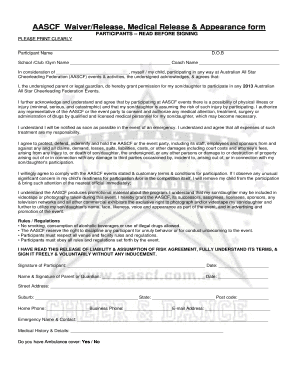
AASCF Waiver/Release, Medical Release & Appearance form PARTICIPANTS -- READ BEFORE SIGNING PLEASE PRINT CLEARLY Participant Name D.O.B School /Club /Gym Name Coach Name In consideration of ,.

How it works

  1. Open form

    Open form follow the instructions

  2. Easily sign form

    Easily sign the form with your finger

  3. Share form

    Send filled & signed form or save

How to fill out the AASCF Waiver/Release online

Completing the AASCF Waiver/Release form is an important step for participants in Australian All Star Cheerleading Federation events. This guide will provide you with clear, step-by-step instructions to help you fill out the form accurately and efficiently.

Follow the steps to fill out the form online:

  1. Click the ‘Get Form’ button to access the AASCF Waiver/Release form and open it in your browser or online document editor.
  2. Clearly print the participant's full name in the designated field, ensuring accuracy for identification purposes.
  3. Enter the participant's date of birth (D.O.B.) in the appropriate field. This information is crucial for age-related event regulations.
  4. Input the name of the school, club, or gym that the participant is affiliated with, along with the coach's name for reference.
  5. In the section that states 'In consideration of', provide the name of the event or activity in which the participant will be involved.
  6. As a parent or legal guardian, sign the form to grant permission for the participant to engage in events. Make sure to date your signature.
  7. Review the risk acknowledgment statement about physical illness or injury, ensuring you fully understand the implications of participation.
  8. Complete the medical authorization section, granting permission for medical treatment if necessary; also confirm financial responsibility.
  9. Fill out the indemnification clause, indicating your agreement to protect AASCF and related parties from claims or damages.
  10. Affirm your agreement to comply with the event's rules and regulations by checking any applicable boxes or providing further information.
  11. Provide your signature, name, and date as the parent or guardian, ensuring clarity and consent.
  12. Complete the contact information section, including your street address, suburb, state, postcode, and phone numbers.
  13. Fill in the emergency contact details for someone who can be reached during the event.
  14. Complete the medical history section if necessary, and indicate whether you have ambulance cover.
  15. Once all fields are accurately filled, you can save, download, or print the completed form for your records.

Complete your documents online today and ensure a smooth registration for AASCF events.

Get form

Experience a faster way to fill out and sign forms on the web. Access the most extensive library of templates available.
Get form

Related content

Secondary Traumatic Stress | Children's Bureau |...
Sep 16, 2016 — ... disclaimer page, and the Child Welfare Information Gateway website...
Learn more
The idea of performance contracting or performance...
efforts from the federal government in the form of the Child and Family Services Review...
Learn more

Related links form

Canada Millennium Asset Protection Claim Form 2021 Canada Millennium Asset Protection Claim Form 2016 Canada Richmond Fire-Rescue 6646962 2021 Canada Parksville Volunteer Fire Department Application Package 2021

Questions & Answers

Get answers to your most pressing questions about US Legal Forms API.

Contact support

The most complete ZIP Code is a nine-digit number consisting of five digits, a hyphen, and four digits, which the USPS describes by its trademark ZIP+4. The correct format for a numeric ZIP+4 code is five digits, a hyphen, and four digits.

If prompted for your ZIP code, just enter the three digits of your postal code plus two zeros. So for example, if your postal code is A2B 3C4, the 5-digit number you should enter is 23400.

Is the hyphen in a ZIP+4® ZIP Code™ number required? Yes, when using a ZIP+4 ZIP Code, the number must consist of five digits, a hyphen (or dash), and four digits.

There may be an extended code (ZIP+4), where a hyphen and a further four digits are added to the five-digit code. If you have the full 9-digit ZIP code you can include this, however, the first five digits are usually adequate.

Get This Form Now!

Use professional pre-built templates to fill in and sign documents online faster. Get access to thousands of forms.
Get form
If you believe that this page should be taken down, please follow our DMCA take down processhere.

Industry-leading security and compliance

US Legal Forms protects your data by complying with industry-specific security standards.
  • In businnes since 1997
    25+ years providing professional legal documents.
  • Accredited business
    Guarantees that a business meets BBB accreditation standards in the US and Canada.
  • Secured by Braintree
    Validated Level 1 PCI DSS compliant payment gateway that accepts most major credit and debit card brands from across the globe.
Get AASCF WaiverRelease
Get form
  • Adoption
  • Bankruptcy
  • Contractors
  • Divorce
  • Home Sales
  • Employment
  • Identity Theft
  • Incorporation
  • Landlord Tenant
  • Living Trust
  • Name Change
  • Personal Planning
  • Small Business
  • Wills & Estates
  • Packages A-Z
  • Affidavits
  • Bankruptcy
  • Bill of Sale
  • Corporate - LLC
  • Divorce
  • Employment
  • Identity Theft
  • Internet Technology
  • Landlord Tenant
  • Living Wills
  • Name Change
  • Power of Attorney
  • Real Estate
  • Small Estates
  • Wills
  • All Forms
  • Forms A-Z
  • Form Library
  • Legal Hub
  • About Us
  • Help Portal
  • Legal Resources
  • Blog
  • Affiliates
  • Contact Us
  • Delete My Account
  • Site Map
  • Industries
  • Forms in Spanish
  • Localized Forms
  • State-specific Forms
  • Forms Kit
  • Real Estate Handbook
  • All Guides
  • Notarize
  • Incorporation services
  • For Consumers
  • For Small Business
  • For Attorneys
  • USLegal
  • FormsPass
  • pdfFiller
  • signNow
  • altaFlow
  • DocHub
  • Instapage
Form Packages
  • Adoption
  • Bankruptcy
  • Contractors
  • Divorce
  • Home Sales
  • Employment
  • Identity Theft
  • Incorporation
  • Landlord Tenant
  • Living Trust
  • Name Change
  • Personal Planning
  • Small Business
  • Wills & Estates
  • Packages A-Z
Form Categories
  • Affidavits
  • Bankruptcy
  • Bill of Sale
  • Corporate - LLC
  • Divorce
  • Employment
  • Identity Theft
  • Internet Technology
  • Landlord Tenant
  • Living Wills
  • Name Change
  • Power of Attorney
  • Real Estate
  • Small Estates
  • Wills
  • All Forms
  • Forms A-Z
  • Form Library
Customer Service
  • Legal Hub
  • About Us
  • Help Portal
  • Legal Resources
  • Blog
  • Affiliates
  • Contact Us
  • Delete My Account
  • Site Map
  • Industries
  • Forms in Spanish
  • Localized Forms
  • State-specific Forms
  • Forms Kit
Legal Guides
  • Real Estate Handbook
  • All Guides
Prepared for you
  • Notarize
  • Incorporation services
Our Customers
  • For Consumers
  • For Small Business
  • For Attorneys
Our Sites
  • USLegal
  • FormsPass
  • pdfFiller
  • signNow
  • altaFlow
  • DocHub
  • Instapage
Social Media
Call us now toll free:
+1 833 426 79 33
As seen in:
© Copyright 1999-2026 airSlate Legal Forms, Inc. 3720 Flowood Dr, Flowood, Mississippi 39232
  • Your Privacy Choices
  • Terms of Service
  • Privacy Notice
  • Content Takedown Policy
  • Bug Bounty Program