Loading
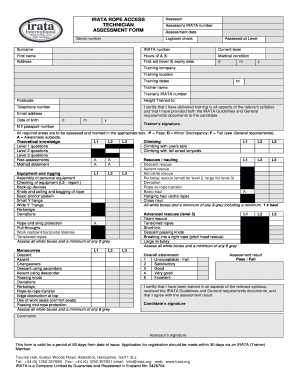
Get Irata Assessment Form
How it works
-

Open form follow the instructions
-

Easily sign the form with your finger
-

Send filled & signed form or save
How to fill out the Irata Assessment Form online
Filling out the Irata Assessment Form online is a straightforward process that ensures proper documentation of training and assessment results. This guide provides step-by-step instructions to help users complete the form accurately and efficiently.
Follow the steps to fill out the Irata Assessment Form online:
- Click the ‘Get Form’ button to obtain the Irata Assessment Form and open it in your desired editor.
- Input the assessor's name and IRATA number in the designated fields to identify the assessor responsible for the evaluation.
- Enter the assessment date, ensuring to format it as day/month/year for consistency.
- Check the logbook and initial to confirm satisfactory details in the candidate's IRATA logbook.
- In the candidate section, provide the surname and first name as they appear in their formal identification.
- Fill out the address, including the postcode, to which relevant documents will be sent.
- Include the candidate's telephone number with appropriate international dialing codes, along with their email address for communication purposes.
- Input the candidate's date of birth in day/month/year format and their national insurance or passport number.
- Document the candidate's current IRATA level and the total hours they have worked under rope access operations, as per their logbook.
- Indicate any medical conditions that may affect the candidate’s ability to perform rope access tasks.
- Provide the expiry date of the candidate’s first aid certificate, if applicable.
- Record information about the training company, including its name, location, and training dates, ensuring accurate representation.
- List the trainer's name and IRATA number to verify the credentials of the person delivering the training.
- Assess the candidate's performance in theoretical knowledge, equipment, manoeuvres, climbing, and rescue sections, marking appropriately in the boxes provided (P, D, F, A).
- Final remarks can be added in the comments section if necessary, providing additional context to the assessment.
- Ensure all required signatures are obtained from the trainer, assessor, and candidate before saving or submitting the form.
- Once completed, you can save your changes, download, print, or share the form as required.
Complete your Irata Assessment Form online today to ensure a smooth assessment process.
Complete a four-day (minimum) rope access training course from an IRATA Training Member Company and managed by an IRATA Level III. Complete a Level III written test. Complete a Level III assessment by an independent IRATA Assessor. IRATA certificates are valid for three years.