Loading
Get Authorization Form For Va Certification - Regis
How it works
-

Open form follow the instructions
-

Easily sign the form with your finger
-

Send filled & signed form or save
How to fill out the Authorization Form For VA Certification - Regis online
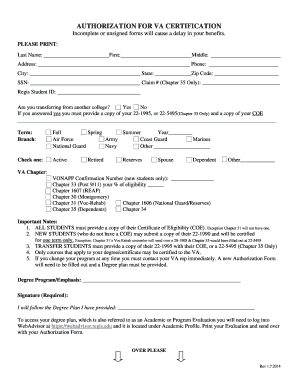
Filling out the Authorization Form For VA Certification - Regis online is an essential step in securing your benefits from the Veterans Administration. This guide provides a clear, step-by-step approach to assist users in accurately completing the form.
Follow the steps to successfully complete the authorization form
- Click ‘Get Form’ button to obtain the authorization form and open it in your preferred editor.
- Print the form, ensuring to use clear handwriting when entering your information. Start with your last name, first name, and middle initial in the designated fields.
- Fill in your complete address, including city, state, and zip code. Provide your phone number for contact purposes.
- Enter your Social Security Number and, if applicable, your Claim Number (only for Chapter 35).
- Provide your Regis Student ID. Indicate whether you are transferring from another college by selecting 'Yes' or 'No'. If yes, remember to attach a copy of your 22-1995 or 22-5495 (Chapter 35 only) along with your Certificate of Eligibility.
- Select the term you are applying for (Fall, Spring, or Summer) and specify the year. Then, indicate your branch of service from the options provided.
- Check the box that corresponds with your current status: Active, Retired, Reserves, Spouse, Dependent, or Other.
- Select the appropriate VA Chapter you are applying under and, if you are a new student, provide your VONAPP Confirmation Number.
- Complete any additional pieces of information required, such as your Degree Program/Emphasis and confirm that you will adhere to the Degree Plan provided.
- Sign and date the form, acknowledging that you have read and understood the important notes and instructions listed on the document.
- Attach all required supporting documents, which may include your Certificate of Eligibility, Degree Plan, and any necessary application forms (e.g., 22-1990, 22-5495, or 22-1995).
- Once you have filled out the form, save any changes made, then download, print, or share it as needed.
Complete your documents online promptly to ensure timely processing of your benefits.
Related links form
Available BenefitsVA pays only the test costs, or up to $2,000 for each test. Fees connected with obtaining a license or certification are not reimbursable. Payment is issued after you submit proof of payment to VA. Find out how your GI Bill entitlement will be charged for taking a Licensing and Certification benefit.