Loading
Get Staff Leased Laptop Request Justification - Forms
How it works
-

Open form follow the instructions
-

Easily sign the form with your finger
-

Send filled & signed form or save
How to fill out the STAFF LEASED LAPTOP REQUEST JUSTIFICATION - Forms online
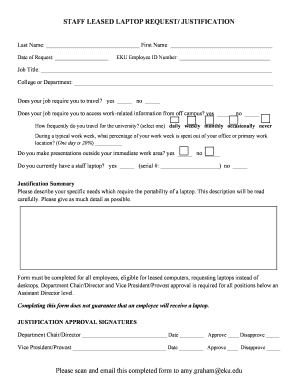
Filling out the STAFF LEASED LAPTOP REQUEST JUSTIFICATION form is essential for users seeking to lease a laptop for work purposes. This guide provides clear instructions to help you complete the form accurately and efficiently.
Follow the steps to successfully complete your laptop request justification.
- Press the ‘Get Form’ button to access the form and open it in your digital editor.
- Enter your last name and first name in the designated fields at the top of the form. Make sure to provide your legal name as it appears in your employee records.
- Fill in the date of your request. Ensure that the date is accurate to maintain proper documentation.
- Input your EKU Employee ID number. This is necessary for identification and processing of your request.
- Provide your job title in the specified space. Use the title as listed in your official employment documentation.
- Select your college or department from the dropdown menu or fill it in if required. This is to categorize the request accurately.
- Answer the questions regarding travel requirements: indicate whether your job requires you to travel and whether you need access to work-related information off-campus. Check the appropriate boxes.
- Indicate how frequently you travel for the university by selecting one option: daily, weekly, monthly, occasionally, or never.
- Estimate the percentage of your work week spent outside of your office or primary work location. Use the guideline that one day equals 20%.
- Answer the question about making presentations outside your work area. Check 'yes' or 'no' based on your role.
- Indicate if you currently have a staff laptop. If yes, provide the serial number in the designated space.
- In the justification summary section, clearly describe your specific needs for a laptop's portability. Be thorough and provide detailed explanations to support your request.
- Ensure approval from your Department Chair/Director by obtaining their signature and date in the corresponding area. They will indicate 'Approve' or 'Disapprove' based on your justification.
- Lastly, acquire the signature and date from the Vice President/Provost. Similar to step 13, they will also indicate their decision.
- Once all sections are completed, save the document. You can also download, print, or share the form if necessary.
Complete your STAFF LEASED LAPTOP REQUEST JUSTIFICATION form online today to streamline your application process.
I am writing this email/letter to you to request for a laptop to use for work. I personally feel that having a laptop can help aid me with my work, my productivity and also improve my service to the company. I hope you take this request into consideration. Thank you for your kind attention.