Loading
Get Demande Dallocation Ou Dallocation Au Survivant Sc Isp-3008f - Servicecanada Gc
How it works
-

Open form follow the instructions
-

Easily sign the form with your finger
-

Send filled & signed form or save
How to use or fill out the Demande DAllocation Ou DAllocation Au Survivant SC ISP-3008F - Servicecanada Gc online
Filling out the Demande DAllocation Ou DAllocation Au Survivant SC ISP-3008F - Servicecanada Gc online can be a straightforward process. This guide will help you navigate through the form's sections and fields, ensuring you provide all necessary information accurately.
Follow the steps to complete your application effectively.
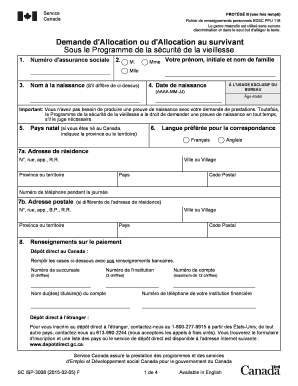
- Click ‘Get Form’ button to acquire the form and open it in your chosen editing application.
- Begin by entering your social insurance number in the first field to identify your application.
- In the subsequent fields, indicate your gender by selecting M (Mr.), Mme (Mrs.), or Mlle (Miss), followed by your first name, middle initial, and last name.
- Provide your birth name if it differs from the name entered above.
- Enter your date of birth using the format YYYY-MM-DD.
- Indicate your country of birth. If you are born in Canada, specify the province or territory.
- Choose your preferred language for correspondence, either French or English.
- Enter your residential address, including the street number, street name, apartment number (if applicable), city or village, province or territory, country, and postal code.
- If your mailing address is different from your residential address, fill out the postal address section with the same details.
- Provide your day-time phone number for any contact purposes.
- For direct deposit in Canada, fill in the required bank information, including branch number, institution number, account holder's name, and account number.
- If you require direct deposit internationally, follow the instructions provided in the form and call the associated helpline for international deposit inquiries.
- Indicate your current marital status, which can influence your eligibility for certain benefits. Select from options such as single, married, common-law partner, separated, divorced, or surviving spouse/common-law partner.
- If you are married or in a common-law partnership, provide the necessary information and proof as requested in the form regarding your spouse or common-law partner.
- Complete the section regarding your legal status in Canada, selecting from citizenship, permanent residency, or other statuses mentioned.
- Fill in the historical residency section with all addresses where you have lived since turning 18, both inside and outside of Canada. Supply evidence as required.
- If applicable, share information regarding benefits you have received or applied for from other countries.
- Provide details about a non-related individual who can confirm your residence in Canada, including their contact information.
- Finally, review and affirm the accuracy of all provided information by signing and dating the application.
- Once you have completed the form, save any changes you made, then download, print, or share the form as required.
Start filling out your Demande DAllocation Ou DAllocation Au Survivant SC ISP-3008F - Servicecanada Gc online today.
WordPress 'Easy Copyright' plugin is used to add copyright to your site using shortcode via admin-panel. You can add, edit, delete copyrights in Easy Copyright wordpress submenu. In order to add copyright you need to press Add New Copyright button in the specified menu and fill required fields.
Industry-leading security and compliance
US Legal Forms protects your data by complying with industry-specific security standards.
-
In businnes since 199725+ years providing professional legal documents.
-
Accredited businessGuarantees that a business meets BBB accreditation standards in the US and Canada.
-
Secured by BraintreeValidated Level 1 PCI DSS compliant payment gateway that accepts most major credit and debit card brands from across the globe.