Loading
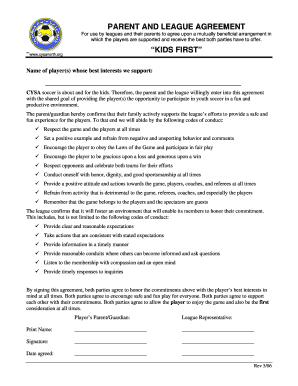
Get Parent And League Agreement Kids First - Cysa District 7 - Cysadistrict7
How it works
-

Open form follow the instructions
-

Easily sign the form with your finger
-

Send filled & signed form or save
How to fill out the PARENT AND LEAGUE AGREEMENT KIDS FIRST - CYSA District 7 online
This guide will provide you with comprehensive instructions on how to complete the PARENT AND LEAGUE AGREEMENT KIDS FIRST - CYSA District 7 form online. The aim is to ensure all users understand the process clearly and can fill out the document with ease.
Follow the steps to effectively complete the agreement.
- Press the ‘Get Form’ button to access the form and open it for editing.
- Begin by entering the name of the player or players in the designated space for 'Name of player(s) whose best interests we support.' Ensure the names are spelled correctly to reflect accurate identification.
- Review the code of conduct for parents and guardians. Familiarize yourself with the shared goals and principles outlined, ensuring you are ready to agree to these commitments in support of the players.
- After reviewing, proceed to the section for signatures. Print your name clearly where it states 'Print Name:' followed by your signature in the respective field.
- In the 'Date agreed:' field, enter the date when you are signing the agreement. This serves to document when the agreement was made.
- Next, the league representative must also print their name and provide their signature in the indicated fields. This signifies mutual agreement and understanding.
- Once all fields are filled out completely and accurately, review the form to ensure that all information is correct and all parties have signed.
- Finally, you can save changes to your document, download a copy for your records, print the agreement, or share it as needed with the league administration.
Complete the PARENT AND LEAGUE AGREEMENT KIDS FIRST - CYSA District 7 online today to support youth soccer and ensure a positive experience for all players.
Scene or section breaks: Scene breaks occur in a story when there is a dramatic shift in scene or a shift to a new character. To indicate a scene break, add a line between paragraphs with three hashtags (###) or three asterisks (***). These characters should be centered on the page, not left-aligned.
Industry-leading security and compliance
US Legal Forms protects your data by complying with industry-specific security standards.
-
In businnes since 199725+ years providing professional legal documents.
-
Accredited businessGuarantees that a business meets BBB accreditation standards in the US and Canada.
-
Secured by BraintreeValidated Level 1 PCI DSS compliant payment gateway that accepts most major credit and debit card brands from across the globe.