Loading
Get State Farm B2b Welcome
How it works
-

Open form follow the instructions
-

Easily sign the form with your finger
-

Send filled & signed form or save
How to fill out the State Farm B2b Welcome online
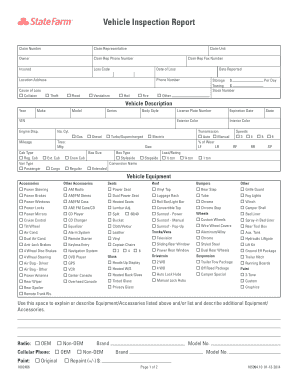
This guide provides step-by-step instructions for completing the State Farm B2b Welcome online. Each section is designed to ensure clarity and ease of use for all individuals, regardless of their experience level with these documents.
Follow the steps to complete your State Farm B2b Welcome form online.
- Click ‘Get Form’ button to obtain the form and open it in the editing interface.
- Begin by entering the claim number in the designated field. This number is essential for tracking your claim efficiently.
- Fill in the claim representative’s name, followed by their phone number for direct communication if needed.
- Provide the owner's name and contact information, including their phone number, to ensure accurate record-keeping.
- Input the insured person’s name along with the loss code that relates to the claim (e.g., collision, theft, flood, etc.). Select the relevant option.
- Record the date of loss and report date. These dates are crucial for establishing the timeline of events.
- Enter the location address where the loss occurred, ensuring accuracy in case further investigations are required.
- In the vehicle description section, fill out the year, make, model, and body style of the vehicle. Include the VIN for precise identification.
- Additionally, provide the engine displacement, exterior and interior colors, and the mileage of the vehicle.
- Complete the vehicle equipment and accessories section by marking the relevant features of the vehicle, such as transmission type, seats, and any additional accessories the vehicle may have.
- In the pre-loss condition section, evaluate the interior and exterior conditions of the vehicle, and provide descriptions where necessary.
- After reviewing all the details entered, ensure all fields are complete and accurate. You may save changes, download, print, or share the completed form.
Start filling out your State Farm B2b Welcome form online today!
You can change your payment method with State Farm by logging into your account online and navigating to the payments section. There, you can edit your payment information, as well as make a payment or adjust scheduled payments.
Industry-leading security and compliance
US Legal Forms protects your data by complying with industry-specific security standards.
-
In businnes since 199725+ years providing professional legal documents.
-
Accredited businessGuarantees that a business meets BBB accreditation standards in the US and Canada.
-
Secured by BraintreeValidated Level 1 PCI DSS compliant payment gateway that accepts most major credit and debit card brands from across the globe.