Loading
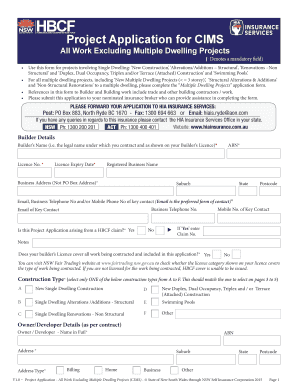
Get Home Warranty Insurance - Job Specific Project Application Form
How it works
-

Open form follow the instructions
-

Easily sign the form with your finger
-

Send filled & signed form or save
How to fill out the Home Warranty Insurance - Job Specific Project Application Form online
Filling out the Home Warranty Insurance - Job Specific Project Application Form online can be straightforward with the right guidance. This guide provides step-by-step instructions to assist users in completing the form correctly and efficiently.
Follow the steps to successfully complete your application.
- Click ‘Get Form’ button to obtain the form and open it in the editor.
- Provide builder details: Enter the builder's name (legal name), licence number, expiry date, ABN, and registered business name, following with business address details.
- Input the key contact information: Include email, business telephone number, and mobile number. Indicate whether the application arises from a HBCF claim and provide the claim number if applicable.
- Construction type selection: Choose the appropriate construction type from options A to F based on the nature of the project.
- Owner/developer details: Enter the owner's name, ABN, address, and contact details, specifying if there is any relationship with the builder.
- Site address information: Fill in the site address including house number, suburb, street name/type, and postcode.
- Contract details: Provide information such as estimated start and completion dates, contract type, contract price, and builder's margin percentage.
- Construction description: Include a description of the construction undertaking, specifying the number of storeys and areas involved.
- Funding and progress payments: Indicate how the project will be funded and confirm if progress payments align with industry guidelines.
- Final steps: Review your entries for accuracy, save changes, and select either to download or print the form. Ensure all necessary signatures are affixed before submitting.
Complete your documents online to ensure a smooth application process.
before the product is available long-term on the US market.” Introducing a new infant formula into the United States commerce without a premarket notification to the FDA is prohibited.
Industry-leading security and compliance
US Legal Forms protects your data by complying with industry-specific security standards.
-
In businnes since 199725+ years providing professional legal documents.
-
Accredited businessGuarantees that a business meets BBB accreditation standards in the US and Canada.
-
Secured by BraintreeValidated Level 1 PCI DSS compliant payment gateway that accepts most major credit and debit card brands from across the globe.