Loading
Get Registration Form For Design Facility - Rvcs
How it works
-

Open form follow the instructions
-

Easily sign the form with your finger
-

Send filled & signed form or save
How to fill out the Registration Form For Design Facility - RVCS online
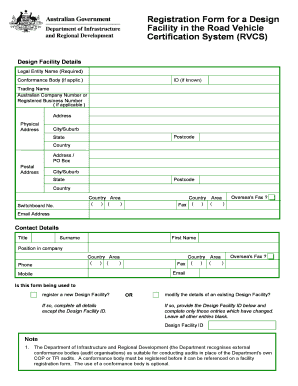
Completing the Registration Form for Design Facility in the Road Vehicle Certification System (RVCS) online is a crucial step in ensuring your facility is recognized by the Department of Infrastructure and Regional Development. This guide provides you with a clear and comprehensive walkthrough of each section of the form, making it easy to submit your application accurately.
Follow the steps to effectively complete the online registration form.
- Click the ‘Get Form’ button to obtain the Registration Form For Design Facility and open it in your preferred online editor.
- Begin with the 'Design Facility Details' section. Enter the legal entity name in the designated field as this is required for your application. If applicable, fill in the conformance body details and provide the ID if known.
- Next, provide the trading name of your facility. If you have an Australian Company Number or Registered Business Number, include that as well.
- Complete the physical address section carefully. Enter the address, city/suburb, postcode, state, and country that correspond with your facility's main location.
- In the postal address section, fill in the relevant fields if your postal address is different from the physical address. Include the city/suburb, state, postcode, and country.
- Enter the switchboard number and fax number if applicable. If you operate an overseas fax, provide that information in the designated field.
- Proceed to the contact details section. Here, specify your title, surname, first name, and position within the company.
- Fill in the contact number, including the country area code, and repeat for the fax number and mobile number.
- Indicate whether this form is for registering a new Design Facility or modifying an existing one. If you are modifying an existing design facility, ensure to provide the Design Facility ID and complete only the fields that have changed.
- Review all the information entered for accuracy and completeness. Ensure that you have addressed every required field.
- Finally, save your changes, and you will have the option to download, print, or share the completed Registration Form.
Start completing your Registration Form for Design Facility - RVCS online today to ensure a seamless registration process.
Industry-leading security and compliance
US Legal Forms protects your data by complying with industry-specific security standards.
-
In businnes since 199725+ years providing professional legal documents.
-
Accredited businessGuarantees that a business meets BBB accreditation standards in the US and Canada.
-
Secured by BraintreeValidated Level 1 PCI DSS compliant payment gateway that accepts most major credit and debit card brands from across the globe.