Loading
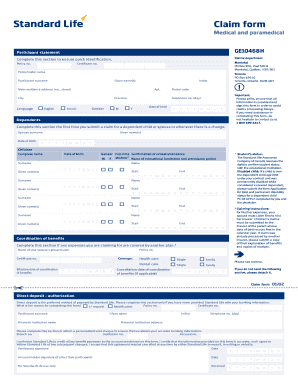
Get Claim Form - Medical And Paramedical Ge10468
How it works
-

Open form follow the instructions
-

Easily sign the form with your finger
-

Send filled & signed form or save
How to fill out the Claim Form - Medical And Paramedical GE10468 online
Filling out the Claim Form - Medical And Paramedical GE10468 online can be a straightforward process when you have the right guidance. This comprehensive guide will help you navigate each section of the form, ensuring you provide all necessary information accurately to facilitate your claim.
Follow the steps to complete your claim form online.
- Click ‘Get Form’ button to obtain the Claim Form - Medical And Paramedical GE10468 and open it in your editor.
- Begin with the participant statement section. Fill in the policy number, certificate number, policyholder name, and participant's surname and given name(s). Ensure that you also include the initial and the main residence address including apartment number, city, province, and postal code.
- Select your preferred language by indicating either English or French and specify your gender.
- Enter your telephone number for daytime contact and your date of birth in the specified format.
- If applicable, complete the dependents section. Include the surname and given names of your spouse or dependent children, along with their respective dates of birth.
- Proceed to the coordination of benefits section if any of the expenses you are claiming are also covered under another plan. Provide the necessary information for your spouse's group insurer.
- If this is your first claim or if you are updating bank information, fill out the direct deposit authorization section with your financial institution's name, address, account number, and signatures as required.
- Complete the medical expenses section. Ensure that you provide the total amount for drug claims, other medical and paramedical expenses, and vision care claims, attaching the relevant receipts as specified.
- For out-of-country expenses, indicate the reason for travel, departure date, and return date, ensuring you understand the submission requirements for these claims.
- If the claim involves an accident, describe the incident and indicate if any expenses have been submitted for reimbursement to a government body.
- In the authorization section, read and understand the statement before signing and dating it. This allows for the release of relevant medical and financial information.
- Finally, review your information for accuracy, save any changes, and then download, print, or share the completed form as needed.
Complete your Claim Form - Medical And Paramedical GE10468 online today to ensure prompt processing of your claim.
A: These denials include, but are not limited to, the lack of establishing medical necessity, services not deemed non-covered under policy, insufficient diagnosis, and medical limits being exceeded. The Explanation of Benefits (EOB) that you receive will provide appeal rights and information on how to file an appeal.
Industry-leading security and compliance
US Legal Forms protects your data by complying with industry-specific security standards.
-
In businnes since 199725+ years providing professional legal documents.
-
Accredited businessGuarantees that a business meets BBB accreditation standards in the US and Canada.
-
Secured by BraintreeValidated Level 1 PCI DSS compliant payment gateway that accepts most major credit and debit card brands from across the globe.