Loading
Get Kywg Form 105 Cd Comm Log Pdf - Kentucky Wing Cap
How it works
-

Open form follow the instructions
-

Easily sign the form with your finger
-

Send filled & signed form or save
How to fill out the KYWG Form 105 CD Comm Log PDF - Kentucky Wing CAP online
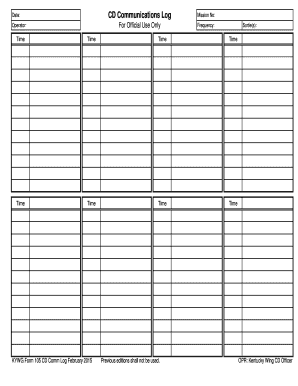
This guide provides clear and comprehensive instructions for filling out the KYWG Form 105 CD Comm Log PDF, designated for logging communications by Civil Air Patrol Rooftop aircraft during disaster response missions. Whether you are a seasoned user or new to the process, this guide ensures you can fill out the form accurately and efficiently.
Follow the steps to complete the KYWG Form 105 CD Comm Log PDF online.
- Click ‘Get Form’ button to obtain the form and open it in your chosen editor.
- Begin by entering the date in the designated field to record when the communications log is being filled out.
- In the operator field, input the name of the individual responsible for completing the log.
- Fill in the mission number, which should be assigned to differentiate between various missions.
- Input the frequency being used for the communications in the corresponding section to manage effective communication during operations.
- List the sortie number(s) related to the mission in the appropriate field, ensuring that all flights undertaken are noted.
- For each call made, insert the aircraft call sign in the blank next to the time entry.
- Record the time of each call in the column labeled 'Time'.
- Next to the time entry, provide the transcript of the call in the space provided, ensuring clarity and relevance.
- Use a separate row for each call made; if there are more than eight aircraft or more than twelve calls for an aircraft, utilize multiple sheets.
- After completing the log, review all entries for accuracy and completeness.
- Finally, save your changes, and be sure to download, print, or share the form as required, and upload the completed log sheet to the sortie files in WMIRS.
Ensure your documents are submitted on time by completing the KYWG Form 105 CD Comm Log online.
Use trusted websites and apps The first step to protect your information is to use reputable and reliable websites and apps for online payments. Look for signs of security, such as HTTPS, padlock icons, and verified certificates.
Industry-leading security and compliance
US Legal Forms protects your data by complying with industry-specific security standards.
-
In businnes since 199725+ years providing professional legal documents.
-
Accredited businessGuarantees that a business meets BBB accreditation standards in the US and Canada.
-
Secured by BraintreeValidated Level 1 PCI DSS compliant payment gateway that accepts most major credit and debit card brands from across the globe.