Loading
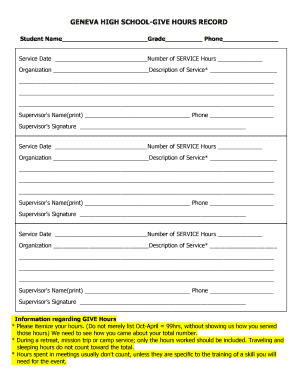
Get Give - Student Record Sheet - Geneva 304 - Geneva304
How it works
-

Open form follow the instructions
-

Easily sign the form with your finger
-

Send filled & signed form or save
How to use or fill out the GIVE - Student Record Sheet - Geneva 304 - Geneva304 online
This guide aims to provide clear instructions on how to complete the GIVE - Student Record Sheet - Geneva 304 - Geneva304 online. It is essential for users to accurately fill out this document to maintain proper records of service hours and activities.
Follow the steps to accurately complete the form.
- Press the ‘Get Form’ button to access the form and open it in the editor.
- Begin by entering the student's name in the designated field at the top of the form. Ensure the name is spelled correctly and clearly.
- Next, fill in the student's grade in the specified section. This is important for record-keeping and organization.
- Provide the student's phone number in the appropriate field, making sure it is current.
- In the section labeled 'Service Date', enter the date on which the service was performed. This should follow the format required by the form (e.g., MM/DD/YYYY).
- Input the total number of service hours completed on that date in the 'Number of Service Hours' field. Be precise and ensure the hours reflect actual time served.
- Fill in the name of the organization where the service was provided. This information helps to verify the service activities.
- In the 'Description of Service' field, give a detailed account of the service performed. Utilize additional lines if necessary to clearly specify activities and outcomes.
- Repeat steps 5 to 8 for each additional service date as required by the form. Ensure that all details are accurately reported, including separate entries for each service event.
- Ensure that the supervisor's name and phone number are filled in for each service entry. These details confirm supervision of the service activities.
- In the designated area, obtain the supervisor’s signature to validate the recorded service hours and activities.
- Review the filled form for accuracy and completeness. Make necessary corrections before finalizing.
- Conclude the process by saving your changes. You can also choose to download, print, or share the completed form as needed.
Complete your documents online today for efficient record-keeping!
Geneva Community Unit School District 304.
Industry-leading security and compliance
US Legal Forms protects your data by complying with industry-specific security standards.
-
In businnes since 199725+ years providing professional legal documents.
-
Accredited businessGuarantees that a business meets BBB accreditation standards in the US and Canada.
-
Secured by BraintreeValidated Level 1 PCI DSS compliant payment gateway that accepts most major credit and debit card brands from across the globe.