Loading
Get Form A21 - Isps Code Declaration Of Cso (pdf) - St Kitts & Nevis ... - Stkittsnevisregistry
How it works
-

Open form follow the instructions
-

Easily sign the form with your finger
-

Send filled & signed form or save
How to use or fill out the Form A21 - ISPS Code Declaration Of CSO (pdf) - St Kitts & Nevis online
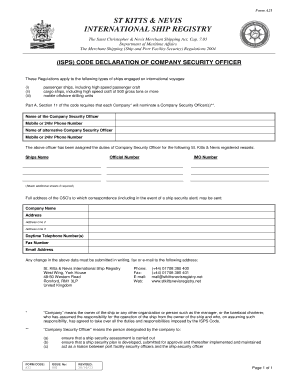
Filling out the Form A21 - ISPS Code Declaration of Company Security Officer is essential for ships engaged in international voyages. This guide will provide you with a step-by-step approach to ensure that you accurately complete the form online.
Follow the steps to fill out the Form A21 effectively.
- Click the ‘Get Form’ button to obtain the form and open it in your preferred PDF editor.
- In the first section, enter the name of the Company Security Officer. Ensure accurate spelling and include their mobile or 24-hour phone number for contact purposes.
- Next, provide the name of an alternative Company Security Officer along with their mobile or 24-hour phone number. This ensures there is a second point of contact.
- List the St. Kitts & Nevis registered vessels for which the above officer has been assigned as Company Security Officer. Include the ship's name, official number, and IMO number. If necessary, attach additional sheets for more vessels.
- Fill out the full address for correspondence regarding the Company Security Officer. This should include the company name, address, and any additional details such as address line 2 or 3.
- Complete the section for daytime telephone numbers, fax number, and email address to ensure effective communication.
- If there are any changes to the provided information, make sure to submit them in writing via fax or email to the specified address for timely updates.
- Once all sections are filled out, review the form for accuracy. You can now save your changes, download the completed form, print it for your records, or share it as needed.
Compete your documents online to ensure compliance and effective maritime safety management.
Not possible. Security and encryption on a PDF file cannot be applied on a per-page basis.
Industry-leading security and compliance
US Legal Forms protects your data by complying with industry-specific security standards.
-
In businnes since 199725+ years providing professional legal documents.
-
Accredited businessGuarantees that a business meets BBB accreditation standards in the US and Canada.
-
Secured by BraintreeValidated Level 1 PCI DSS compliant payment gateway that accepts most major credit and debit card brands from across the globe.