Loading
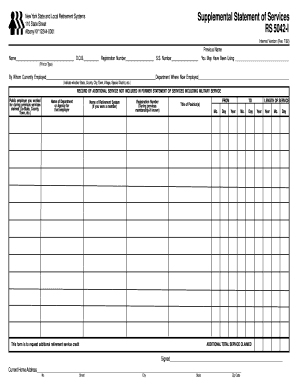
Get Supplemental Statement Of Services Rs 5042-i - Btboces
How it works
-

Open form follow the instructions
-

Easily sign the form with your finger
-

Send filled & signed form or save
How to fill out the Supplemental Statement Of Services RS 5042-I - Btboces online
Filling out the Supplemental Statement Of Services RS 5042-I - Btboces form is a crucial step for individuals seeking to request additional retirement service credit. This guide will provide you with clear, step-by-step instructions to ensure your completion of the form is accurate and efficient.
Follow the steps to successfully complete your online form.
- Click the ‘Get Form’ button to access the form and open it in the online editor.
- Begin by entering your personal information in the designated fields. This includes your name, date of birth, registration number, and social security number. Ensure that all details are accurate and typed clearly.
- Indicate the previous name under which you may have been using services. This field is important for establishing your service history.
- Provide the name of the current employer and the specific department where you are employed. Clearly state whether your employer is a state, county, city, town, village, or special district.
- In the ‘Record of Additional Service Not Included’ section, list the names of public employers you worked for during previous services claimed. Include the name of the department or agency where you were employed and the corresponding retirement system.
- For each prior service, fill in the registration number if known, the title of the position held, and the dates of service. Be sure to specify the length of service accurately in years and months.
- After entering all relevant details, review the entire form for any errors or omissions. It is important to ensure that everything is correct before submitting.
- Once you are satisfied with the information provided, save any changes made to the document. You can also choose to download, print, or share the completed form as needed.
Complete your documents online today to ensure a smooth submission process.
The bullet chat function enables audiences to "shoot" their comments immediately onto the video that they are watching. Bullet chats interrupt the video's content and reflect users' immediate responses since the bullet chats and video timeline are synchronized.
Industry-leading security and compliance
US Legal Forms protects your data by complying with industry-specific security standards.
-
In businnes since 199725+ years providing professional legal documents.
-
Accredited businessGuarantees that a business meets BBB accreditation standards in the US and Canada.
-
Secured by BraintreeValidated Level 1 PCI DSS compliant payment gateway that accepts most major credit and debit card brands from across the globe.