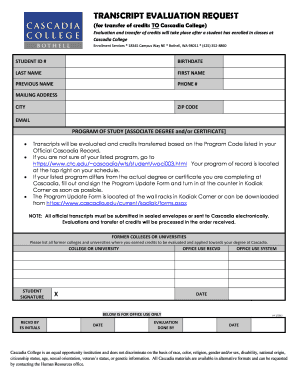
TRANSCRIPT EVALUATION REQUEST (for transfer of credits TO Cascadia College) Evaluation and transfer of credits will take place after a student has enrolled in classes at Cascadia College Enrollment.
Open form follow the instructions
Easily sign the form with your finger
Send filled & signed form or save
How to fill out the Cascadia Transcript online
Filling out the Cascadia Transcript is an essential step for students wishing to evaluate and transfer credits to Cascadia College. This guide will provide a clear, step-by-step approach to successfully completing the form online.
Follow the steps to accurately complete your Cascadia Transcript
- Press the ‘Get Form’ button to access the document and open it in the online editor.
- Fill in your student ID number in the designated field.
- Enter your birthdate in the format required by the form.
- Complete the fields for your last name, first name, and previous name if applicable.
- Provide your phone number in the appropriate section.
- Fill out your mailing address, including city and zip code.
- Add your email address to ensure communication from the college.
- Select your program of study, indicating whether it pertains to an associate degree or certificate.
- List all former colleges or universities from which you earned credits to be evaluated.
- Write your signature to validate the information provided in the form.
- After completing the form, review all entries for accuracy. You can then save your changes, download a copy, print it, or share it as needed.
Complete your documents online today to ensure a smooth transfer process at Cascadia College.
Experience a faster way to fill out and sign forms on the web. Access the most extensive library of templates available.
Related content
Feb 11, 2016 — The Cascadia subduction zone could deliver the worst earthquake in North...
Order your official Cascadia transcript online 24/7 through the National Student...
It was a raw transcript that was messy and John went through and edited it not just for...
Get answers to your most pressing questions about US Legal Forms API.
What is Cascadia College Human Resources phone number?
Cascadia College is prohibited from discrimination by college policy, state and federal law. Persons with disabilities needing assistance in the application process may make a request to the Human Resources Office by calling 425.352. 8880.
How do I contact Cascadia enrollment?
For admissions and enrollment questions, please contact Enrollment Services by emailing enrollment@cascadia.edu or admissions@cascadia.edu phone at 425-352-8860, or by Virtual Assistance Drop-in sessions through the Student Services Virtual Assistance webpage.
How do I contact Ed Gov about fafsa?
For potential students, currently enrolled students, loan borrowers, and families, visit the “Contact Us” page, or contact Federal Student Aid at 1-800-433-3243 or by email at studentaid@ed.gov to be directed to someone who can help you.
How do I send my transcripts to common app?
Log in to your Common App account. Click My Application, and then click Colleges Attended. 2. Next to each college/program you have selected, you will see a notation about transcripts and a link to order transcripts.
What is Cascadia College acceptance rate?
It is a small institution with an enrollment of 1,451 undergraduate students. The Cascadia acceptance rate is 100%. Popular majors include Liberal Arts and Humanities, Business, and Computer Programming.
How long does it take for fafsa to process?
If you submitted your Free Application for Federal Student Aid (FAFSA®) form online, then the U.S. Department of Education (ED) will process your application within three to five days. If you submitted a paper FAFSA form, your application will be processed within seven to ten days.
How do I contact Cascadia College financial aid?
If you have any questions or need assistance, please email finaid@cascadia.edu.
Use professional pre-built templates to fill in and sign documents online faster. Get access to thousands of forms.
If you believe that this page should be taken down, please follow our DMCA take down process here.