Loading
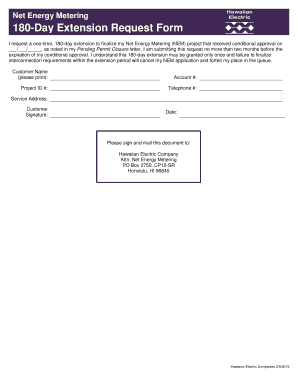
Get 180day Extension Request Form
How it works
-

Open form follow the instructions
-

Easily sign the form with your finger
-

Send filled & signed form or save
How to fill out the 180-Day Extension Request Form online
Filling out the 180-Day Extension Request Form is an essential step for users seeking an extension to finalize their Net Energy Metering project. This guide will provide you with clear, step-by-step instructions to ensure a smooth online application process.
Follow the steps to complete your extension request form successfully.
- Click the ‘Get Form’ button to access the 180-Day Extension Request Form and open it for editing.
- In the 'Customer Name' field, please print your full name as it appears on your account. This helps ensure accurate processing.
- Enter your 'Account #' in the designated field. This number can be found on your utility bill and is necessary for your request to be linked to your account.
- Provide your 'Project ID #' in the appropriate section, which identifies your specific Net Energy Metering project. This can also be found in your previous correspondence regarding your project.
- Include your 'Telephone #' to ensure that the Hawaiian Electric Company can reach you if there are questions or issues regarding your request.
- Fill in your 'Service Address' where the project is located. This should be the address associated with your account.
- Sign in the 'Customer Signature' section to confirm your request. This signature must be handwritten and is required to validate your submission.
- Date your application in the 'Date' field. Ensure this is before you send in your request.
- Review all provided information for accuracy to avoid processing delays. Make necessary changes if needed.
- Once you have completed the form, you can save your changes, download a copy for your records, print the form if you wish to send it physically, or share it as necessary.
Take action now and complete your 180-Day Extension Request Form online to ensure your project stays on track.
Related links form
List of EAD Category Codes with 180 Days Automatic Eligibility Info USCIS EAD Category CodeEAD Category Eligibility Description180 Days Automatic Extension EligibilityA03RefugeeYesA04Paroled as refugeeNoA05Asylee (granted asylum)YesA06K1 non-immigrant fiancé(e) of US Citizen K2 child of K1No53 more rows • Mar 7, 2023
Industry-leading security and compliance
US Legal Forms protects your data by complying with industry-specific security standards.
-
In businnes since 199725+ years providing professional legal documents.
-
Accredited businessGuarantees that a business meets BBB accreditation standards in the US and Canada.
-
Secured by BraintreeValidated Level 1 PCI DSS compliant payment gateway that accepts most major credit and debit card brands from across the globe.