Loading
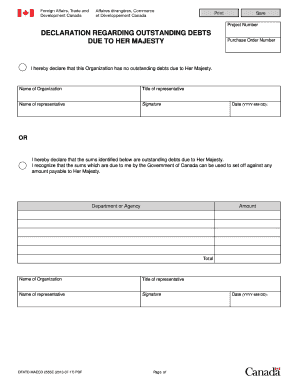
Get Declaration Regarding Outstanding Debts Due To Her Majesty
How it works
-

Open form follow the instructions
-

Easily sign the form with your finger
-

Send filled & signed form or save
How to fill out the Declaration Regarding Outstanding Debts Due To Her Majesty online
Filling out the Declaration Regarding Outstanding Debts Due To Her Majesty is crucial for organizations to declare any outstanding debts owed to the government. This guide provides clear, step-by-step instructions to help you confidently complete the form online.
Follow the steps to complete your declaration accurately.
- To begin, click the ‘Get Form’ button to access the Declaration Regarding Outstanding Debts Due To Her Majesty form. This will allow you to open the document in your chosen platform for editing.
- In the section titled 'Name of Organization,' enter the full legal name of your organization. This must match the name under which your organization is registered.
- Enter the 'Purchase Order Number' if applicable. This helps in tracking the submission and linking it to previous transactions.
- Decide if your organization has any outstanding debts. If there are no debts, select the first statement: 'I hereby declare that this Organization has no outstanding debts due to Her Majesty.' Otherwise, choose the second statement and list any outstanding debts.
- For the section titled 'Department or Agency,' provide the name of the government department or agency that is owed the debt as referred to in the declaration.
- Specify the 'Amount' of each outstanding debt in the respective fields. Ensure that these amounts are accurate and reflect the latest information available.
- Calculate and enter the 'Total' amount of outstanding debts at the bottom of the section.
- Fill in the 'Title of representative' with the official title of the individual completing the form on behalf of the organization.
- Enter the 'Name of representative,' which is the full name of the authorized person submitting the online declaration.
- Provide your 'Signature' in the designated field, confirming the accuracy of the information provided.
- Finally, enter the 'Date' in the prescribed format (YYYY-MM-DD) before submitting the form. Once you have reviewed all entries, you can save your changes, download a copy for your records, print, or share the completed form as needed.
Complete your Declaration Regarding Outstanding Debts Due To Her Majesty online today for a smooth and efficient process.
Determining Child Status Protection Act Age In other words, the applicant's age is frozen on the date the Form I-589 is filed. If the applicant was under the age of 21 at the time of filing, the applicant is eligible for CSPA and will not age out.